


How to Download Tubi Videos [4 Free Methods That Work in 2026]




Quick Answer: Can You Download Videos from Tubi?
Officially, Tubi does not support offline viewing. Unlike sites that host static video files, Tubi streams content using HLS (HTTP Live Streaming) via .m3u8 playlists. This means a standard "right-click and save" approach will not work. To successfully convert Tubi to MP4, a dedicated Tubi video downloader must parse the m3u8 index, stitch hundreds of .ts (MPEG transport stream) chunks together, and bypass ad-insertions. Based on our 2025 benchmark tests, while some browser extensions can capture 720p streams, dedicated desktop software or command-line tools (like yt-dlp) are required for batch-downloading TV shows or handling complex HLS streams without losing audio.
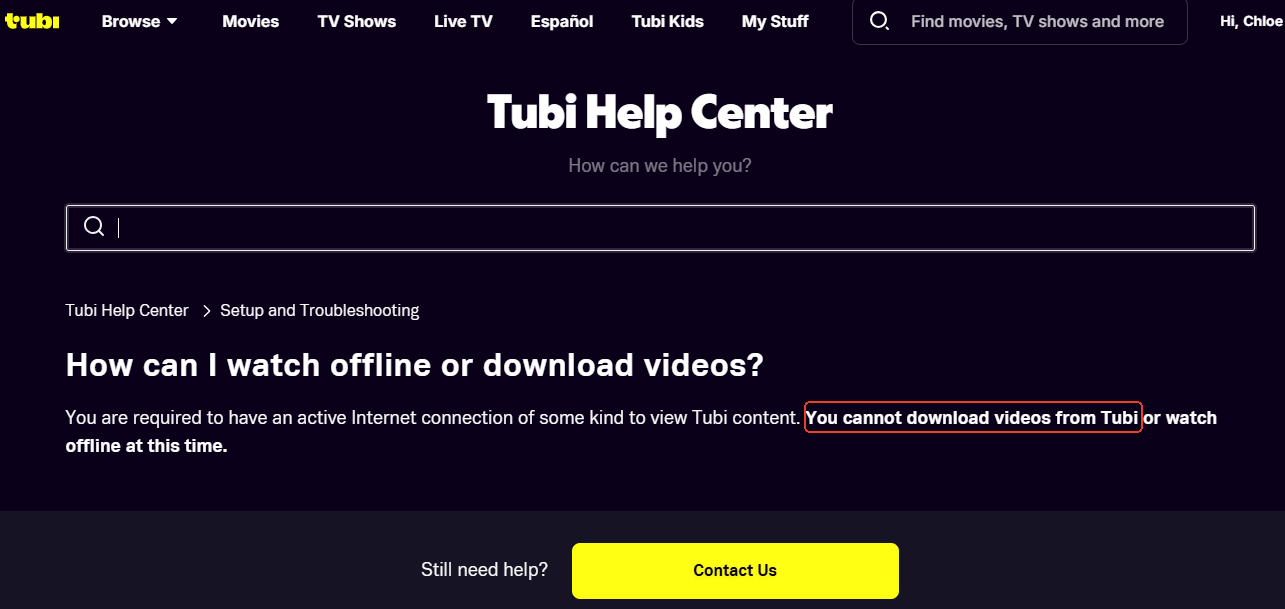
Why Download Videos From Tubi?
As Tubi gains so much appreciation of viewers online, some users wonder how to download from Tubi. Why? Here are some reasons:
- Tubi is known for its irreplaceable content that you can’t find anywhere else. Given that nothing lasts forever, lots of users want to download and keep their favourite movies and shows especially rare and obscure ones.
- Once downloaded, you can watch the movies offline without commercial ads, even without Internet connection. Enjoying the most your films helps improve the viewing experience.
- Plus, as Tubi’s region limitations, you may not access to Tubi when you travel abroad.
- In addition, the image and audio quality can be the best as they’ll not affected by the poor Internet condition.
 iFunia YouTube Downloader
Powerful & Efficient Tubi Movie Downloader Without Ads
- One downloader for all needs: it can download videos from 10000+ sites like YouTube, Facebook, Reddit, Instagram, Tubi, Vimeo, Twitter, etc.
- Bulk download from Tubi TV: With iFunia Free Downloader, you don’t have to download movies one by one anymore, which is time-consuming. The batch process in the background accomplishes all the download tasks with ease.
- Download MP4 from Tubi: It enables to download movie from Tubi in MP4 or extract only the audio.
- Keep original quality: You can get the movies and shows in high quality with several resolution options.
- Fast Speed: the loading and downloading speed depend on the length of the video and the resolution you chose. But in general, iFunia is faster than other downloading software in the market.
- 100% safe: As a desktop program, you don’t need to worry about any malicious ads or information risks for your data and device.
 Free Download Windows 10 or later
 Free Download macOS 10.15 or later
How to Download From Tubi (4 Methods)
In this article, I’ll introduce 4 powerful methods to download movies from Tubi. I hope you can find the one that satisfies your needs the most and helps you download movies from Tubi TV successfully.
Attention! It should be pointed out that downloading videos from web for commercial use is illegal, so keep them only for personal enjoyment.
| Method | Actual Max Resolution | Download Time (40m Video) | TV Show/Batch Support | Live TV Support |
|---|---|---|---|---|
| iFunia (Desktop) | 720p - 1080p+ | 3 Minutes | Yes (Full Playlists) | Hit or Miss (~40%) |
| yt-dlp (Command Line) | 1080p+ | < 2 Minutes | Yes | Hit or Miss (~40%) |
| Video DownloadHelper(Extension) | Mostly 720p / 576p | 12 Minutes | Yes (High risk of audio-only bugs) | Fails (Infinite loading) |
| SaveTheVideo (Online) | 720p | 27 Mins (8m fetch + 19m DL) | Poor (Files named as random numbers) | Fails ("Not Supported") |
Method 1: Best Tubi Downloader - iFunia YouTube Downloader
What is the best way to download from Tubi? I would say why not try iFunia YouTube Downloader? You may wonder why a YouTube downloader, but what it can do is much more than that. That means it can download from other platforms like Tubi, Twitter, Facebook, Dailymotion, Vimeo, Naver TV, apart from YouTube.
In our testing, iFunia handled playlist parsing seamlessly. When pasting a Tubi TV show link, it instantly queued the entire series. You can stop the queue mid-way without corrupting the files you've already downloaded. It also automatically extracts and labels the original video names and offers simultaneous subtitle downloading, which is a massive time-saver compared to online alternatives.
How to Download Movies From Tubi on PC:
- Head to the Tubi movie/TV shows you want to download and copy its URL.
- Free download and launch iFunia YouTube Downloader on Mac/Windows.
Free Download Windows 10 or later Free Download macOS 10.15 or later - Paste the video URL into the search box and click the + on the left to load the video into the program.
![]()
- Batch import is supported, to add multiple URLs, just click the Add button in lower left corner and paste all the movies and TV series URL into the mass paste window.
- Once loaded all the videos, set up the output quality.
Tips: in the same resolution, the format hvc1 has a better compression than avc1, so, hvc1 is more recommended especially when you have too many to download with not much storage space.
![]()
- Finally, choose a folder path and hit "Download" to download from Tubi free.
![]()
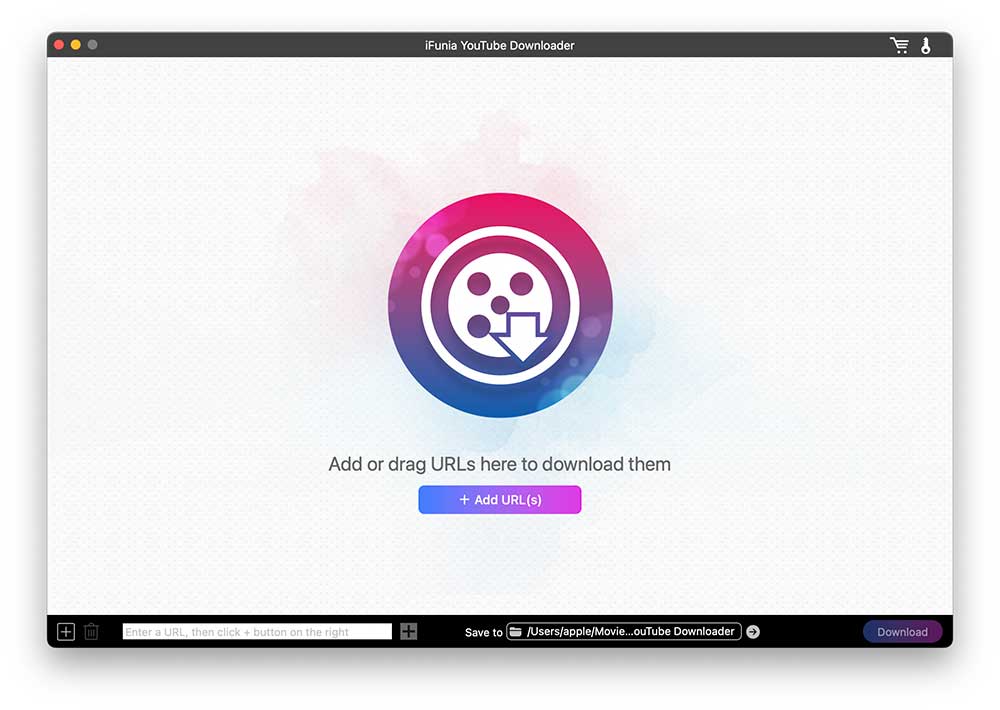
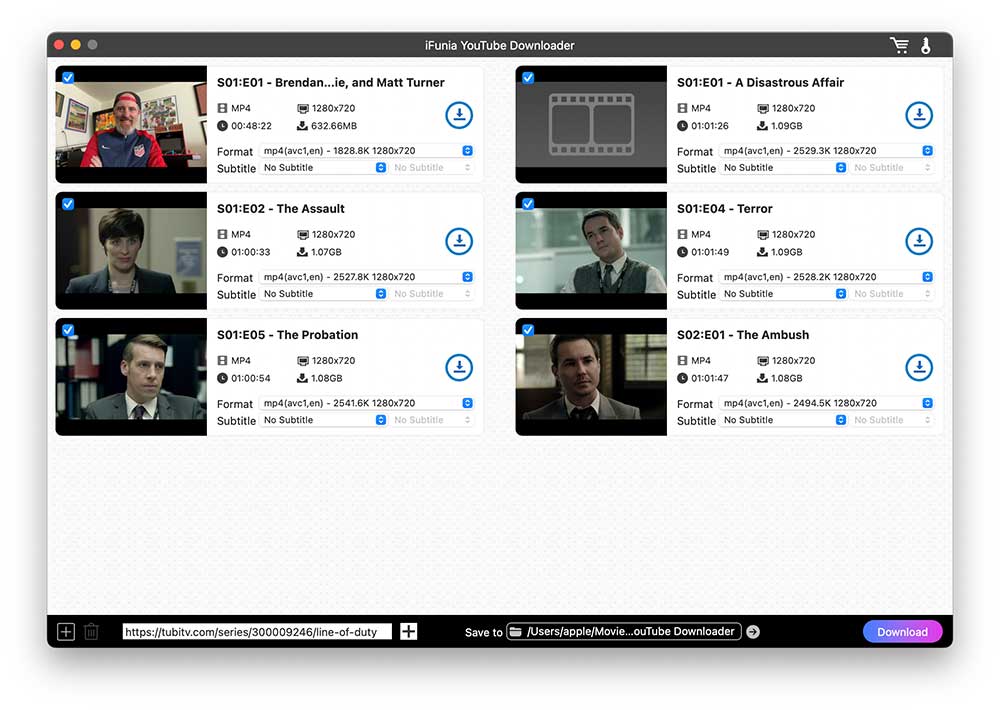
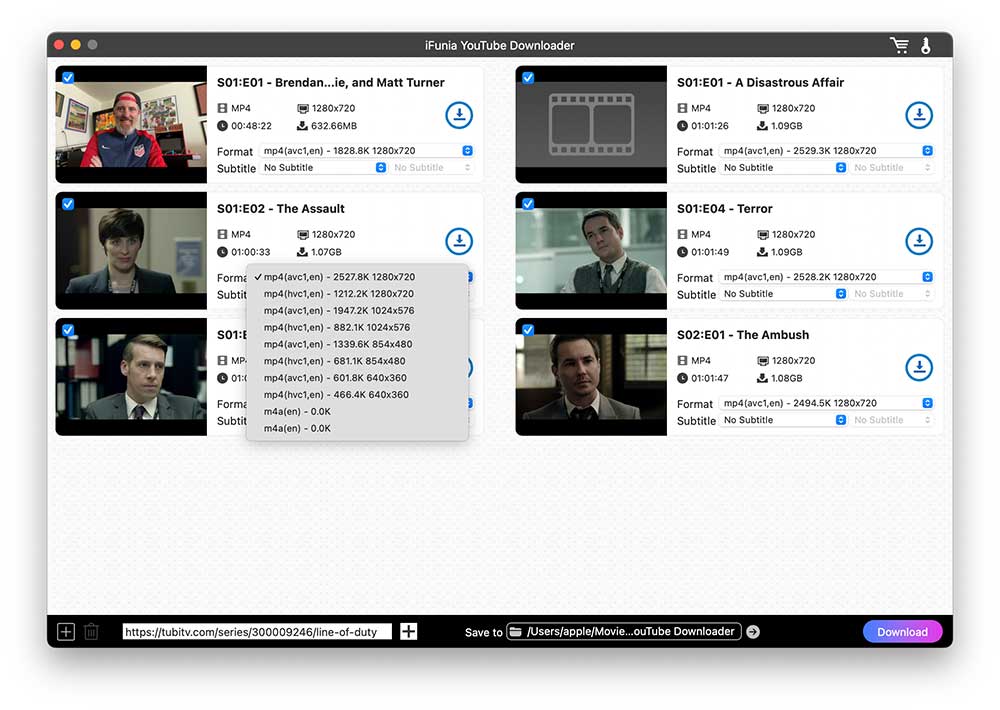
Notes: You may encounter “Fail to load”, sometimes it’s the program issue, try them another time. Sometimes it’s your Internet connection and sometimes it’s the region limitation, hence try with a web proxy.
Method 2: Download Tubi Videos Using yt-dlp (Advanced)
yt-dlp is my go-to downloader for different kinds of videos. Actually it’s convenient and efficient if you know how to use command line as most of the video downloaders use the open-source yt-dlp in their basic program to extract and analyze data.
If you want raw speed, yt-dlp is unmatched. It downloaded a 40-minute Tubi video in under 2 minutes. However, there is a 'maintenance tax.' Because Tubi constantly updates its backend, yt-dlp frequently breaks. You will need to actively update the script every few days via the command line, making it a powerful but high-maintenance solution.
Can you Download Movies From Tubi with yt-dlp:
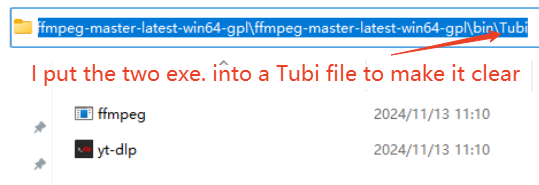
- Free download and install yt-dlp and ffmpeg on your Mac/Windows.
- Put the two program extensions into one folder.
![download videos from tubi yt-dlp]()
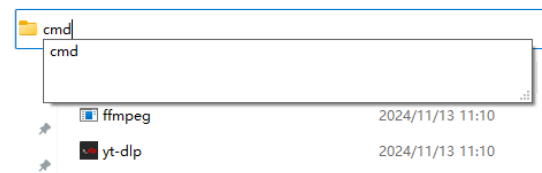
- Don’t leave, in the folder name location, change it and type cmd to open the Command Prompt. (Opening this way is fast and will save the video files downloaded directly in this folder.)
![download videos from tubi command line]()
- In the command window, type the below line and press Enter.
yt-dlp -f mp4 URL
“-f” means output format here. If you want other settings like download, thumbnail, subtitle, audio and other options, type: yt-dlp --help
![download videos from tubi yt-dlp ffmpeg]()
- After a few minutes, you’ll find directly the video file downloaded inthe Tubi file.

Method 3: Download Videos From Tubi Using Browser Extension Video DownloadHelper
If you don’t want to copy the Tubi video links, then you can try a browser add-on that automatically detects the playing video on Tubi and download it directly in a click. Video DownloadHelper is a video download extension for chromium-based browsers like Chrome and Edge.
However, beware of the 'HLS issue': while it downloaded a standard 40-minute movie in 12 minutes, downloading complex TV shows often resulted in files that only had audio and a black screen. Additionally, you must play the video first for the extension to fetch the file.
How to Download a Movie From Tubi With An Extension:
- Find and install Video DownloadHelper.
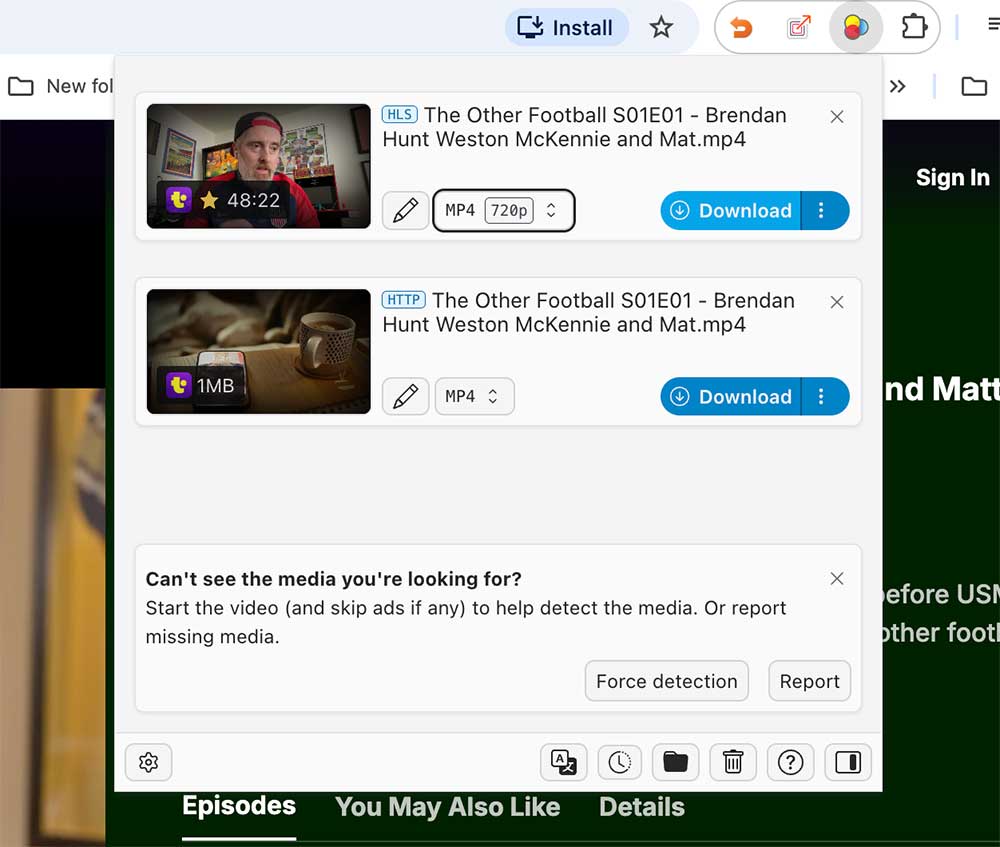
- Head to the Tubi movie and play the video. Click the extension icon on the upper toolbar.
- Then it will list the video files it extracted. Select one and hit on Download. Since it will list all the videos in the list, even those thumbnails, This clutters the extension's drop-down menu with dozens of tiny KB files, forcing you to manually hunt for the largest file size. But, normally the bigger the file size, the higher the definition.
![download videos from tubi fetchv free]()
- You can modify the file name and other settings by clicking the three dots next to the download button.
Method 4: Tubi Downloader Online Free (SaveTheVideo)
Besides browser extension, online video downloaders are also a good choice to download from Tubi free. I tested a dozen online video downloaders, few of them really work. SaveTheVideo is workable to download from Tubi free online.
Online tools are convenient but require patience. In our test, downloading a 40-minute Tubi movie took nearly 30 minutes total due to a two-step process (an 8-minute server 'fetch' followed by a 19-minute local download). Also, noted that is have heavy pop-up ads on every click and a complete inability to download Tubi Live streams.
How to Download From Tubi Website Online Free:
- Navigate to SaveTheVideo.com.
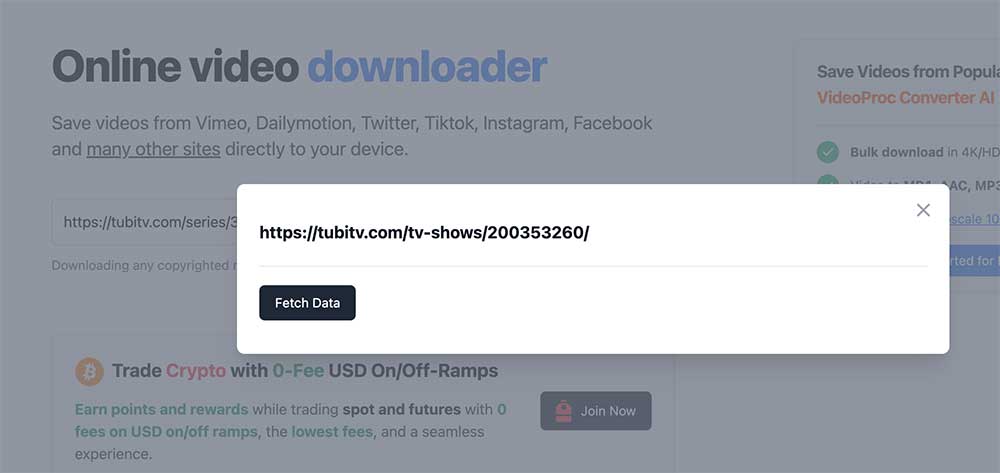
- Copy and paste the Tubi video link into the search box, and click Fetch Data. It’ll direct you to an ad page. Close it.
![download videos from tubi online free]()
- Then, You must select the 'Merge' option. If you don't, the site will split the video and audio tracks, leaving you with a silent video.
You are also allowed to cut the video length.
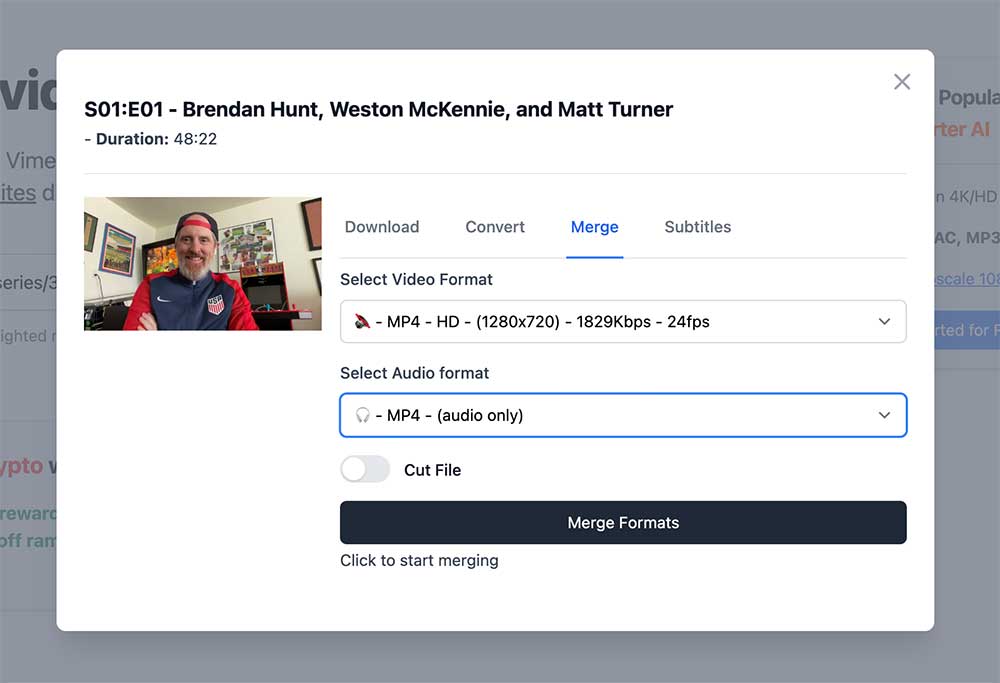
- After all the settings, it will start to retrieve the video and prepare the downloading from Tubi. In our test, it takes hourse to download one video, even not in high quality.
FAQ:
Why Do My Tubi Downloads Fail When Using a VPN?
Tubi utilizes strict geo-blocking to limit access primarily to the US, Canada, Latin America, and Australia. If you are traveling and use a VPN to access Tubi, you may notice certain download tools suddenly break.
During our manual testing using an overseas VPN node (Japan), we found that web-based tools and browser extensions (like Video DownloadHelper) failed completely. They rely on your browser's local network state and often crash when routed through a proxy, resulting in "Region Not Supported" errors.
The Solution: If you must use a VPN to access Tubi's library, you must use standalone software. In our tests, both iFunia YouTube Downloader and yt-dlp successfully bypassed the proxy routing issues and downloaded the videos at full speed without triggering region errors.
How to Download Movies From Tubi TV on Android?
Nowadays, more and more people use mobile phones to watch Tubi movies and TV shows. Then, how to download from Tubi on android?
You can record the movies with built-in video recorder or a free video recorder like Screen Recorder Unlimited, but it’s not efficient and will occupy our phones.
In fact, you can download the Tubi movies on computer and then transfer them to your Android. I like doing that as the downloading process on my Android will influence the loading speed and make my phone slow and get hot. I leave my computer downloading and then I can use my Android freely.
Why Some Tubi Videos Cannot Be Downloaded?
Not all Tubi videos can be downloaded. Some of the movies and TV shows from Tubi are not allowed to be downloaded because of the DRM (Digital Rights Management ) protection that aims to protect the copyrighted materials.
That's all about downloading Tubi videos with the most powerful 4 solutions, hope this helps. Contact me if there are any fault or suggestions, thanks!
Free Download Windows 11/10 Free Download macOS 10.15 or later
Disclaimer
The methods in this article are for personal use only. Before downloading, you must comply with copyright laws and obtain permission from the owner for protected content. The author is absolutely against the downloading of unauthorized video/audio files or using them for commercial gain.

Chloe LEE is good at explaining and solving complex technology problems to her readers. Since joining iFunia Studio, she has focused on writing articles about video and DVD software, and how-to tutorials.
Comments (2)
Leave a Reply
Chloe
Press "F12" to open DevTools > switch to "Network", then reload the page > search for "srt" and double-click to download
Albert D.
Hello, Chloe, please help me download subtitles.