


How to Download All Videos from YouTube Channel (Tested & Working April 2026)




Downloading one video is easy… you just search on google and a bunch of video downloading sites will get the job done. but downloading an entire YouTube channel is not.
YouTube doesn’t offer an official bulk download tool, and many free online downloaders have limits, ads, or stop working after YouTube updates.
In this article, I’ll introduce 4 easiest and most efficient ways to download all YouTube videos from a channel, from super-easy desktop programs to free command-line tools that power users love on Reddit. If you just want to know which one’s the best, I recommend you check with the comparison table first.
 iFunia YouTube Downloader
Best YouTube Channel All Video Downloader
- Download a whole YouTube channel. It batch downloads entire YouTube playlists and channels without limit at once.
- Download from any site. It downloads videos from 10000+ streaming platforms like Facebook, TikTok, Dailymotion, Wistia, Vimeo, Twitter, etc.
- Generate Subtitles. With various languages to choose as the subtitle.
- Download to MP4. Several output format options.
- Download to 1080P, 4K. It allows to conserve the full original quality or upgrade to higher definition.
- Fast speed. The program is faster than other downloaders with advanced technologies.
- Easy to use. With a simple interface and efficient buttons, you can simply get your video downloaded in a few clicks.
- Safe & legitimate. As a desktop program instead of an online server, you don’t need to worry about any malicious ads or information risks for your data or devices.
 Free Download Windows 10 or later
 Free Download macOS 10.13 or later
Quick Comparison - Best Ways to Download All Videos from a YouTube Channel
To download all videos from YouTube channel, you need a professional YouTube Channel Downloader that can bulk download YouTube channel in a go by simply copy & paste the channel link address.
| Tool | Type | Best For | Cons | Difficulty | Cost | Updated 2026? |
|---|---|---|---|---|---|---|
| iFunia YouTube Downloader | Desktop | Simple one-click channel download with 4k quality | May have paid upgrades | Very Easy | Free (limited) | Yes (very active) |
| yt-dlp | Command-line | Free with high quality, recommended a lot by Reddit users | Needs terminal/commands | High | Free | Yes (very active) |
| JDownloader 2 | Desktop app | Bulk downloading with scheduling capabiltity | Heavier software | Easy | Free | Yes |
| youtubeplaylist.cc | Web-based | Quick & no software needed | Has daily limits, ads, privacy risks | Very Easy | Free (limited) | Often break |
#1. Channel YouTube Download with iFunia YouTube Downloader
iFunia YouTube Downloader is a popular media software appreciated by people around the world, like Noemi B. Banks from Softonic said:
"iFunia YouTube Downloader is a free YouTube downloader for both Mac and Windows PC. It can download YouTube videos successfully. In addition, it supports to download from other 1000+ websites, even it can download YouTube playlist and supports batch downloads. Once you have copied the YouTube URL, it will auto paste URL for download, you can save the videos as MP4 or MP3. The download can be processed very fast."
How to Download All Videos From a YouTube Channel With iFunia:
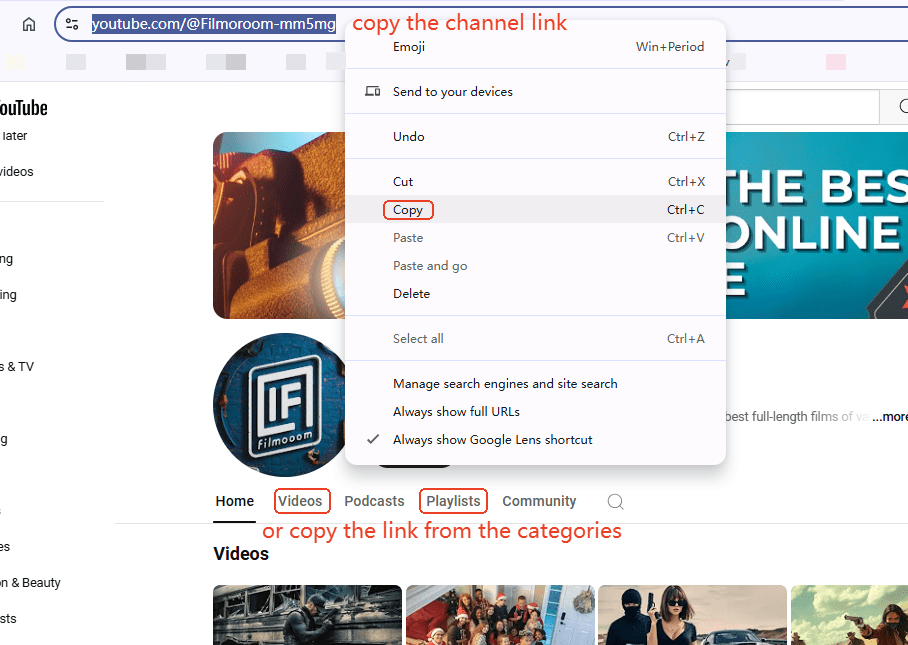
1. Head to the YouTube channel and find the channel URL. For example: https://www.youtube.com/@Filmoroom-mm5mg, or, copy the video category link: https://www.youtube.com/@Filmoroom-mm5mg/videos, or a playlist organized by the creator: https://www.youtube.com/watch?v=FwRmDhdPGR w&list=PLvp_qdTwJYumP8GXbjjaDLgBoHxSSnCBR
2. Free download iFunia YouTube Downloader on Mac/Windows.
Free Download Windows 10 or later Free Download macOS 10.13 or later
3. Paste the channel link into the search box, and click the ➕ on the right to load all the videos from the channel into the software.
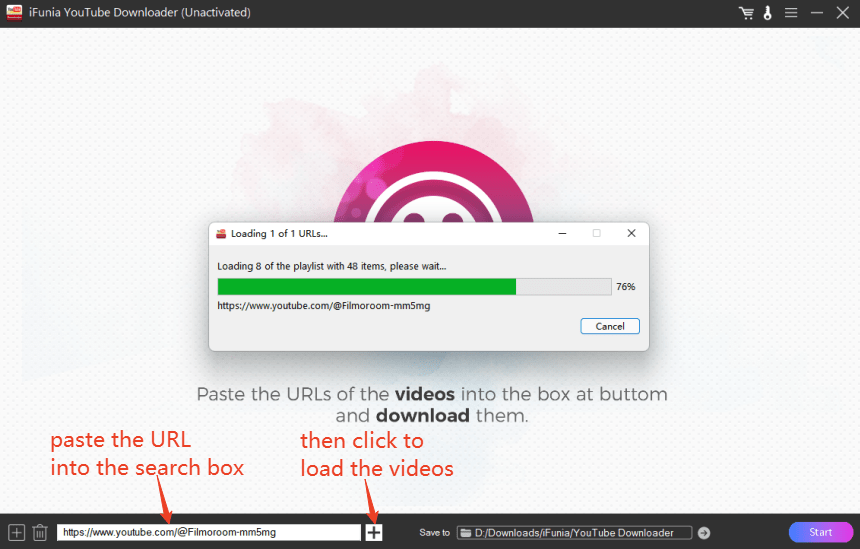
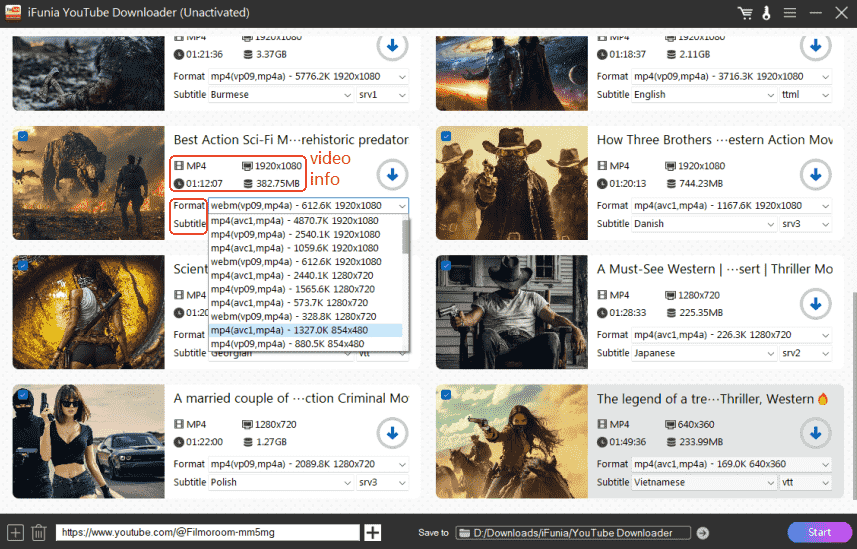
4. Wait for about two minutes, and all the videos will be imported successfully. Then, choose an output format, a proper resolution, and a subtitle language among the long list of options.
Tips: MP4 is the most popular video format that can be played on most devices and platforms;
vp09 delivers videos of higher quality like HD/4K at low bit rates. It has greater compatibility but generates bigger file size;
avc1 has better compression ability while keeping a good quality, hence smaller file size;
The higher the resolution, the clearer the image and the bigger the file size.
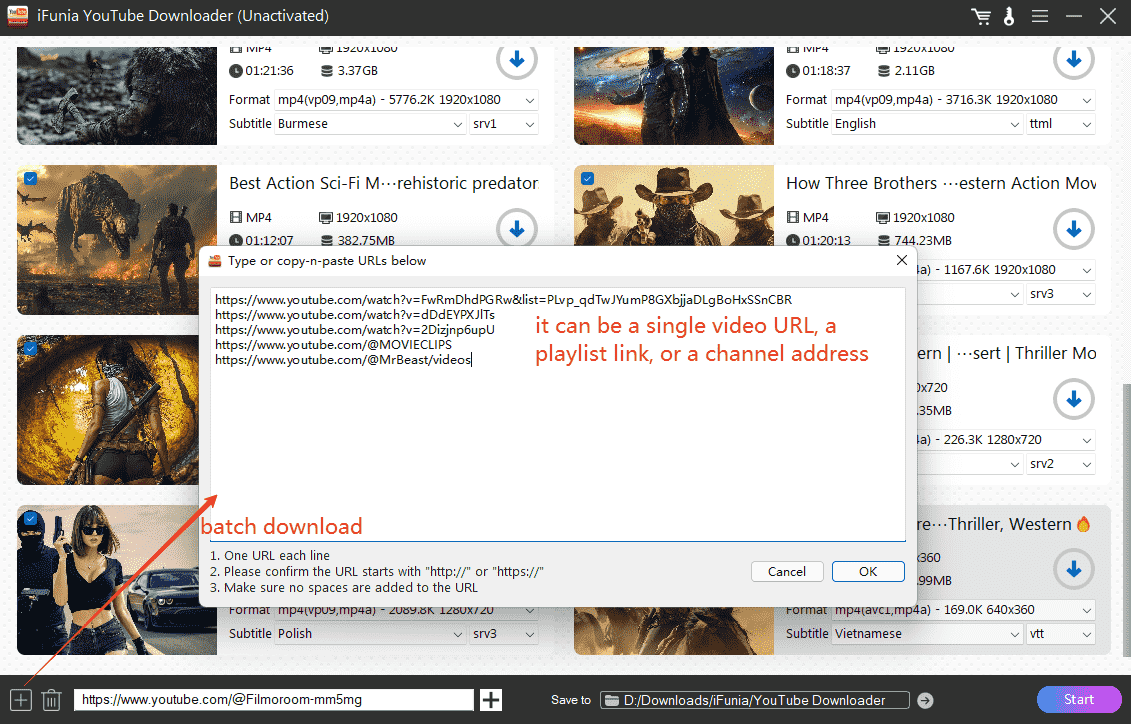
5. If you want to add more video links in bulk, click the ➕ on the left to batch download YouTube channel.
6. Finally, choose a destination path at the bottom and click Start to download all YouTube videos from a channel.
#2. Most Powerful – yt-dlp (Command Line – Best for Power Users)
Youtube-dlp is a command line software that can free download videos from many streaming sites, especially from YouTube. You type the command lines into the program and it gives you the results in a few seconds.
However, for people never used command lines before, yt-dlp can be very complicated with its not user-friendly interface and using experience. Plus, you have to type the exact lines, or you get error messages.
How To Download All YouTube Channel Videos with yt-dlp:
- Get yt-dlp downloaded and installed from GitHub.
- Find and open Prompt Commands on Windows by searching “cmd” or Terminal on Mac.
- Drag the yt-dlp .exe file into the interface and type the line like I did:
yt-dlp --format mp4 https://www.youtube.com/@Filmoroom-mm5mg
![download all videos from a youtube channel]()
- Now wait for the software download full YouTube channel for you.
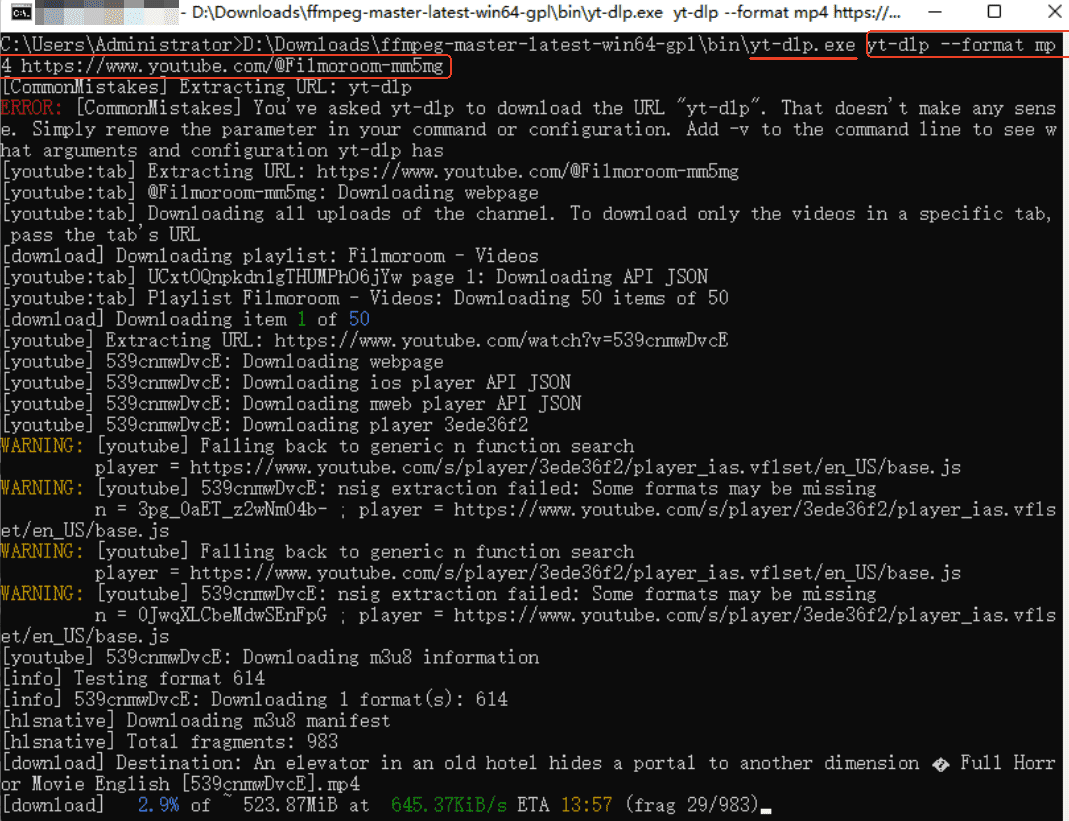
Tips: if you just want to download a part of the videos in the channel, add “-I” after yt-dlp like: yt-dlp -I 1:3,6,9:11 URL, you'll download the items at index 1,2,3,6,9,10,11;
For more settings, enter the line "yt-dlp --help" for more options.
#3. For Massive Queues – JDownloader 2
JDownloader 2 is a download manager that can batch download entire YouTube channel free. It’s fast and powerful with plenty of settings and features. In addition, it can be used on Windows, macOS, and Linux.
But many users give the feedback that JDownloader 2 is not safe to use.
How to Download All YouTube Videos From a Channel Via Jdownloader 2:
- Download JDownloader 2, it should be noted to get the adware-free setup from the official site.
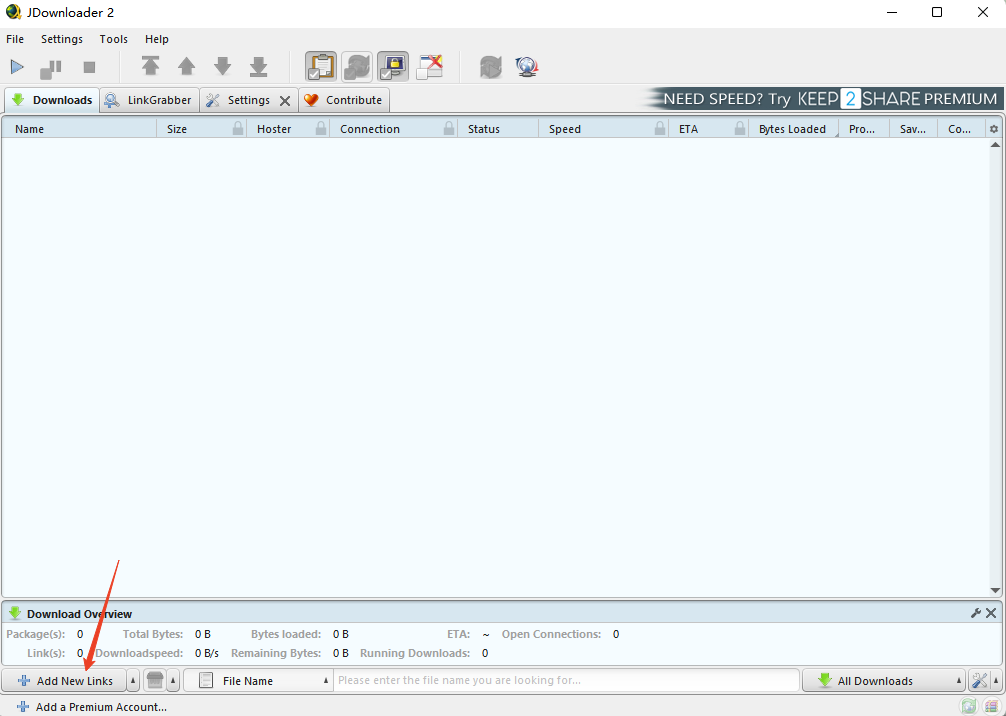
- Copy the YouTube channel link and click Add New Links to paste the link.
![download all videos on youtube channel]()
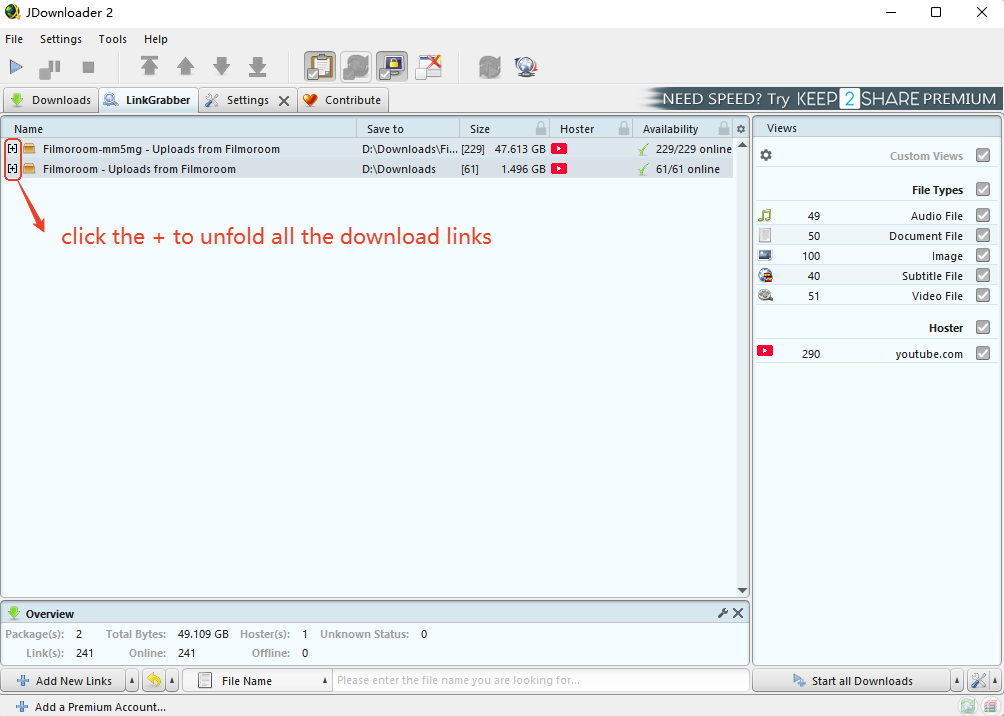
- It will take a few minutes to grab all the download links. Once it’s done, click the + mark to display all the download links, including the video, audio, subtitles, and the images.
![download a whole youtube channel]()
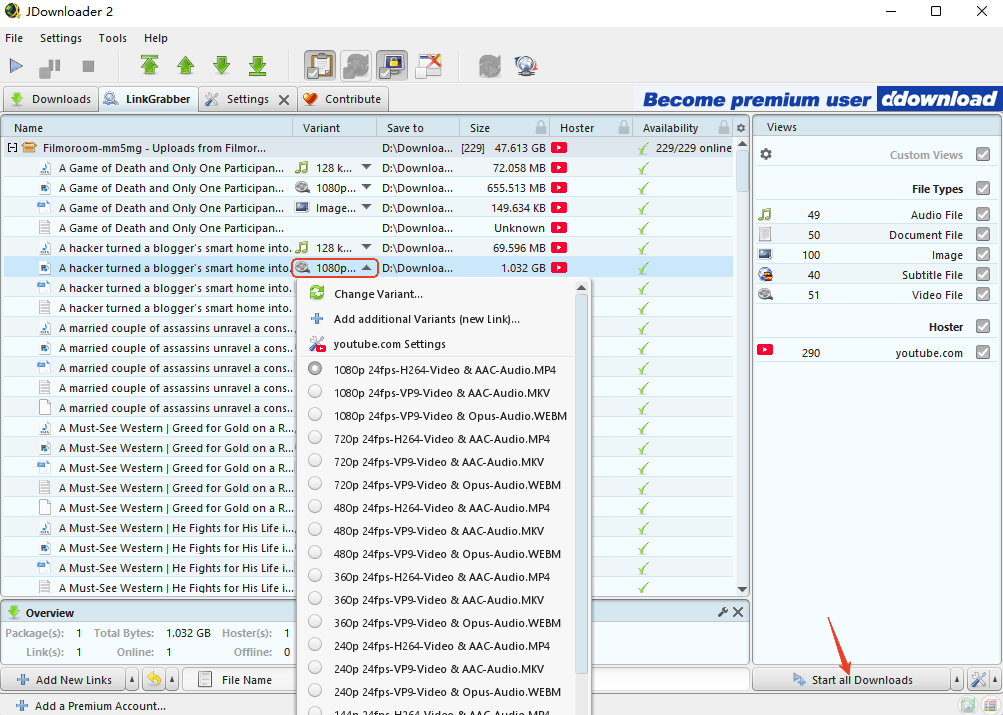
- You can delete the files you don’t want, and change the format and resolution according to your needs.
![download full youtube channel]()
- Hit on the Start all Downloads button to download all channel videos youtube.
Tips: click Settings from the upper menu to specify your download preferences.
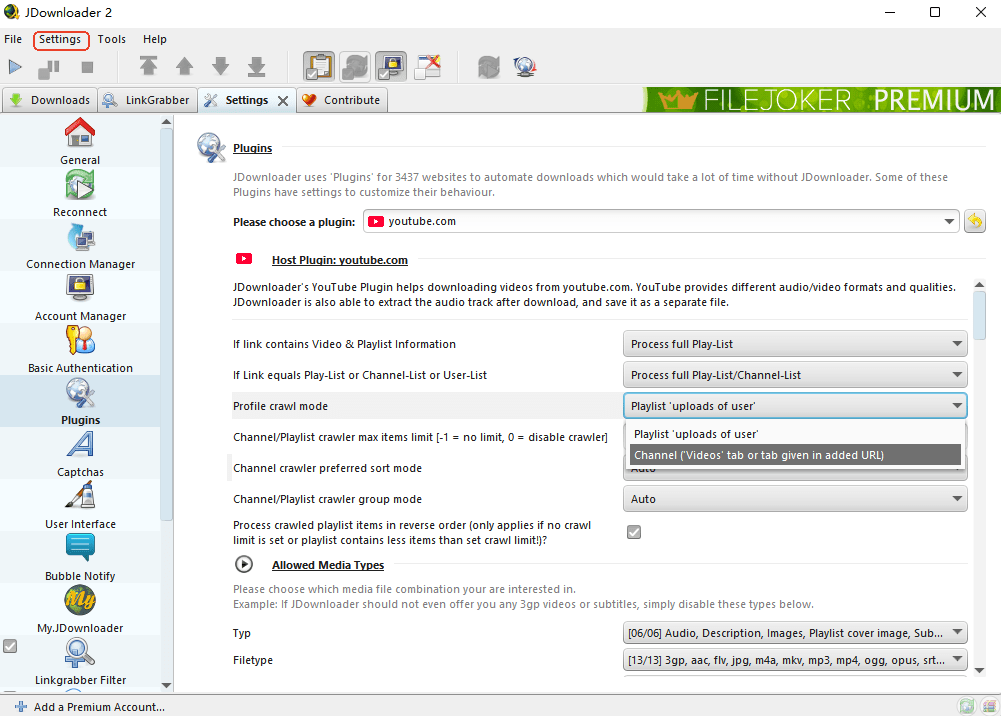
#4. Download All Videos From a YouTube Channel Online
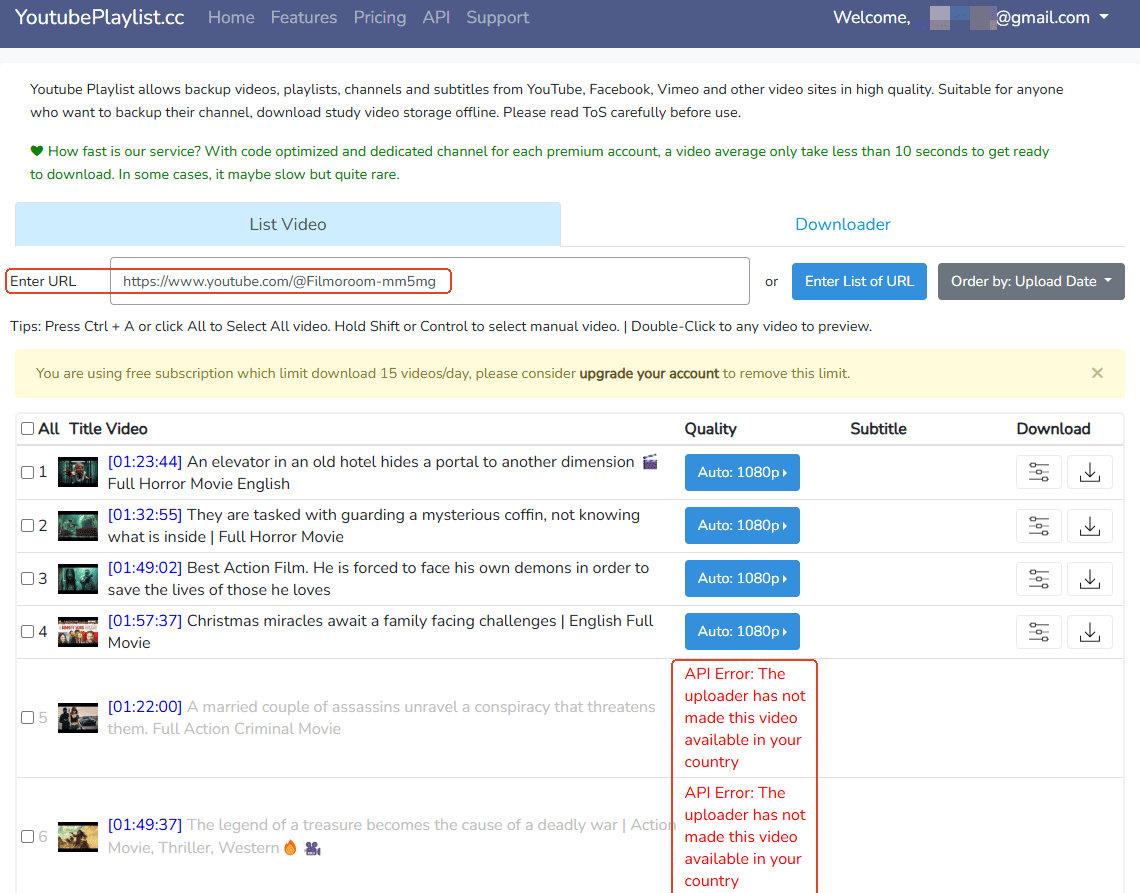
Online methods allows us a quick download without installation, the best online server to download all videos from a YouTube channel is YoutubePlaylist.cc. It really works and convenient to use.
However, please be informed that it demands a login and some of the videos cannot be downloaded because of API error. What’s more, it has limit download of 15 videos per day and limit video duration of 30 minutes for free subscription.
How to Download Entire YouTube Channel Online:
- Head to https://youtubeplaylist.cc/. Create your account and log in.
- Copy and paste the YouTube channel link. You’ll find that some videos cannot be loaded.
![how to download all videos from a youtube channel]()
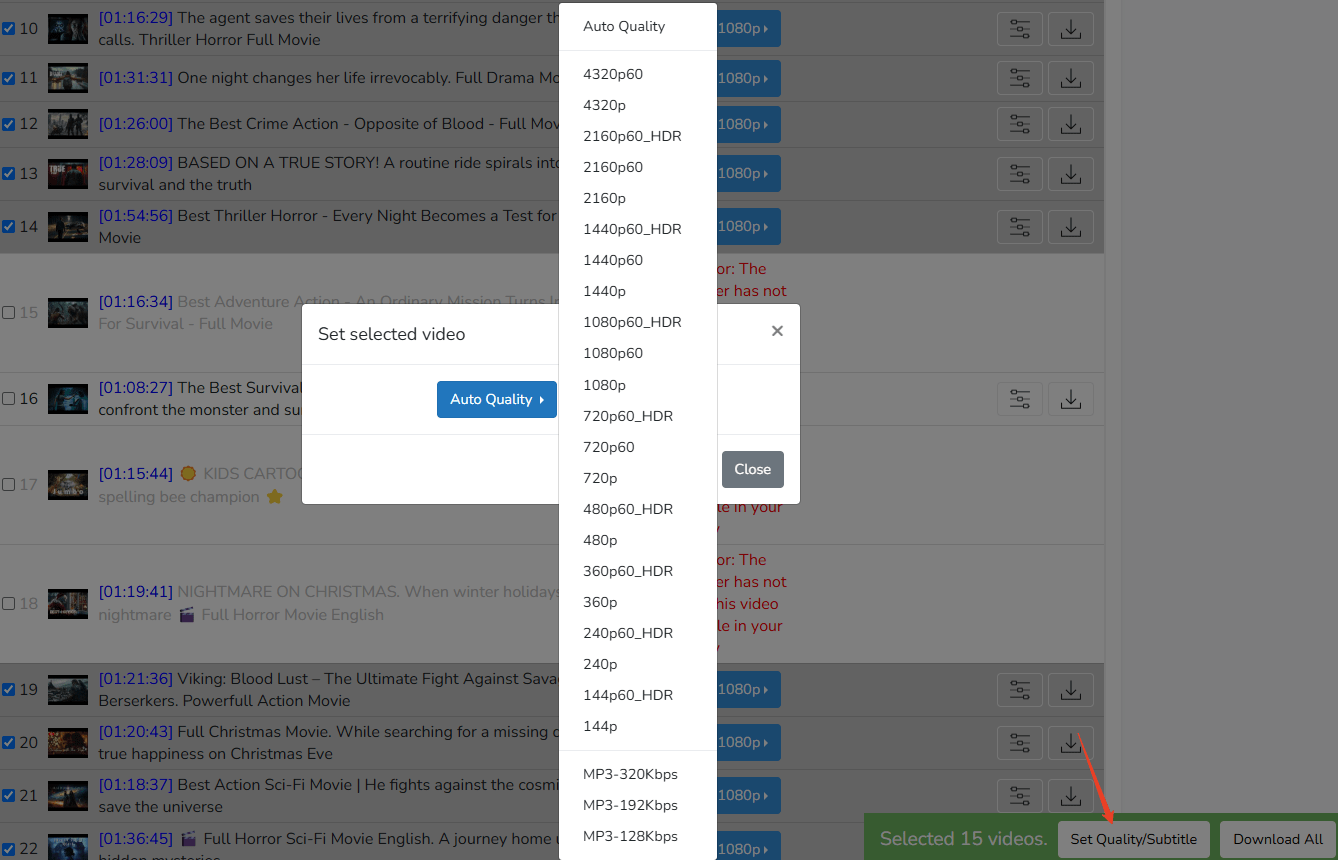
- Press Ctrl on the keyboard and use the mouse to choose 15 videos with less than 30 minutes (only 15 free video downloads within 30 minutes).
- Hit on Set Quality/Subtitle button to choose the output qualit. Click Download All and then download in ZIP.
![download all videos from youtube channel online]()
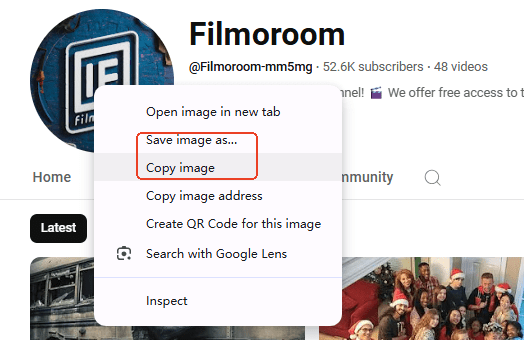
Bonus: Download YouTube Channel Profile Picture
The simplest method for YouTube channel pfp download and YouTube channel banner download is right-click the image and save the image.
For a different size and quality, you can navigate to this online tool for YouTube channel logo free download.
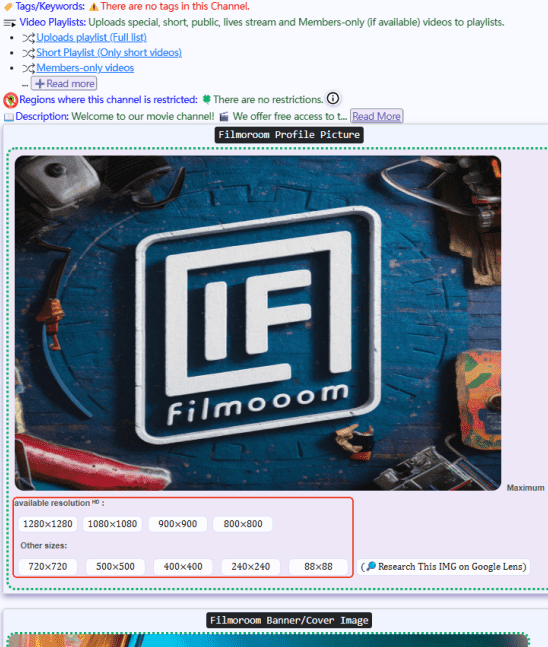
Plus, you can try to download it with JDownloader 2.
Top 10 Most Subscribed YouTube Channels
| Rank | Channel | Subscribers | Since | Style |
|---|---|---|---|---|
| 1 | MrBeast | 342M | 2012 | Lifestyle |
| 2 |
T-Series |
283M |
2006 | Music |
| 3 |
Cocomelon |
188M |
2006 | Entertainement |
| 4 |
SET India |
181M |
2006 | Lifestyle |
| 5 |
Vlad and Niki |
131M |
2018 | Lifestyle |
| 6 |
Kids Diana Show |
129M |
2015 | Entertainement |
| 7 |
Like Nastya |
124M |
2016 | Lifestyle |
| 8 |
Zee Music Company |
113M |
2014 | Entertainement |
| 9 |
PewDiePie |
110M |
2010 | Gaming |
| 10 |
Stokes Twins |
107M |
2008 | Lifestyle |
FAQs
Can I download private or members-only videos from YouTube channel
Private or members-only videos cannot be downloaded by most tools, you need tools that support downloading with account login, iFunia YouTube Downloader is one of the few tools that support downloading age restricted or private videos.
Is it legal to download all videos from a YouTube channel?
You can only download videos for personal offline use; downloading, redistributing, or using videos for commercial purposes violates YouTube’s Terms of Service and copyright laws.
Does downloading support 4K/1080P HD quality?
Yes. iFunia, yt-dlp, and JDownloader 2 support high resolutions up to 4K. Most online tools support up to 1080P.
What output formats are supported?
Common formats include MP4, M4V, MKV, WEBM, and MP3 audio. MP4 is the most widely compatible for playback on all devices.
How long does it take to download an entire YouTube channel?
The speed depends on your network, the number and length of videos, and the tool used. Desktop tools like iFunia and JDownloader 2 are much faster than online tools. For a channel with 50+ videos, it usually takes several minutes to over an hour.
That's all about how to download all YouTube videos from a channel, thanks for being patient and finishing the whole post. I hope you can find the most efficient downloader that help you solve your problem at once. Downloading an entire YouTube channel doesn’t have to be complicated. Start with iFunia YouTube Downloader if you want simplicity, or yt-dlp for maximum power and reliability in 2026.
Disclaimer
The methods in this article are for personal use only. Before downloading, you must comply with copyright laws and obtain permission from the owner for protected content. The author is absolutely against the downloading of unauthorized video/audio files or using them for commercial gain.

Chloe LEE is good at explaining and solving complex technology problems to her readers. Since joining iFunia Studio, she has focused on writing articles about video and DVD software, and how-to tutorials.
Comments (0)
Leave a Reply