


Family Guy Episode MP4 Download [Free 2025]




Family Guy is one of my favorite animated series since I was a teenager. It’s been on the air for such a long time that I consider the characters as my old friends. Its humor style mixes up satire, controversial topics, and it tackles taboo subjects in a really chill way.
After over two decades with 23 seasons and over 400 episodes, this show’s always gotten a strong fan base. I’ve watched almost all the episodes, some for two or three times, but I never get bored, on the contrary, I discover new references and reveal nuances and jokes every time I rewatch it.
As a big fan who has watched Family Guy series for many times and will watch for more times in the future, I’ll share my experiences about how to free watch them and download full seasons and episodes offline.
- Part 1: Where to Watch and Download Family Guy
- Part 2: How to Download Full Seasons of Family Guy
- Part 3: Fun Facts About Family Guy
- * Family Guy was Once Cancelled Twice
- * Family Guy has comic book version
- * Seth MacFarlane Does Multiple Voices
- * Brian Was Dead and Resurrected by Fans
- * Family Guy Has Won 22 Awards
 iFunia YouTube Downloader
Great Choice for Family Guy All Seasons Download
- Broad platform compatibility: iFunia supports downloads from YouTube, Facebook, Reddit, and most major video sites. This means you can easily access TV series regardless of where they’re hosted online.
- Bulk download feature: it can download entire seasons in batches without the hassle of saving one episode at a time, which is perfect for binge-watching the series.
- High quality + small file sizes: iFunia optimizes video compression, ensuring HD+ crisp visuals while keeping file sizes manageable, which is ideal for storing entire seasons.
- Watch on iPhone/Android: download episodes in MP4 and transfer them seamlessly to iPhone, Android, or tablets, then you can watch Family Guy offline anytime, anywhere, and across devices.
- Built-in video player: after downloading, you can watch videos within iFunia. No need for third-party media players, which improves your viewing experience from download to playback.
- Security & Reliability: iFunia’s desktop app is ad-free and malware-free, download TV shows without risking data breaches, viruses, or intrusive ads, which is more reliable than shady online sites.
 Free Download Windows 10 or later
 Free Download macOS 10.13 or later
Part 1: Where to Watch and Download Family Guy
In this part, let’s discover first where to watch and download Family Guy episodes. Then, in part 2, we’ll break down and figure out the best way to download from those sites. If you already find where to watch, skip to part 2 to directly download them.
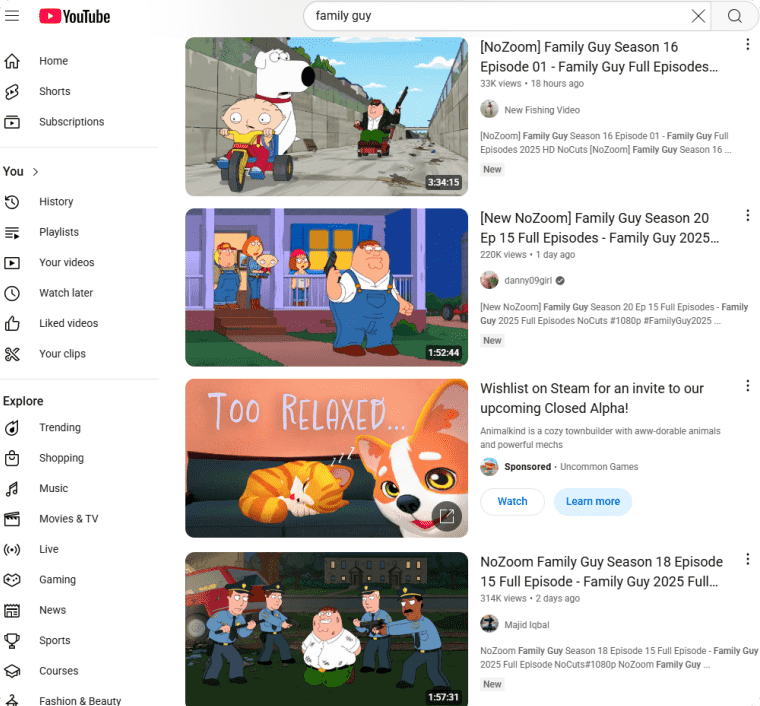
1. YouTube
You can find a great number of fan-uploaded clips of Family Guy on YouTube, the biggest streaming platform every knows. Sometimes you are lucky to find complete episodes as well. I like watching on YouTube as the clips are the highlight parts in the episodes and I get the nuances by reading the comments, it’s like a community.
Pros:
- Free
- High quality
- With subtitles
- Rich fan-uploaded clips
- Easy to download (see in Part 2)
Cons:
- Frequent ad breaks
- Not complete
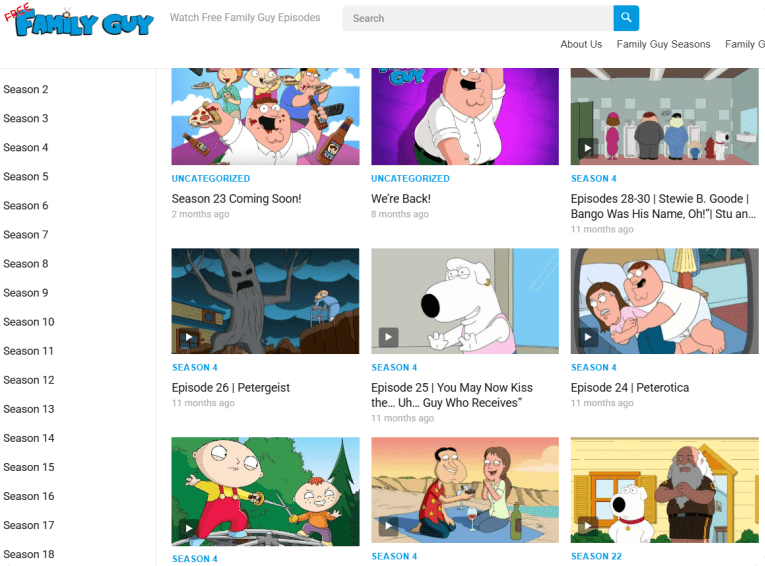
2. freefamilyguy.com
freefamilyguy.com is a website blog dedicated for Family Guy episode watching with a plot line review, which helps preview and better understand the details in the shows. You can also find Family Guy movies and the series Bob’s Burgers on it.
Pros:
- Free
- Full seasons and episodes
- Easy to download (see in Part 2)
Cons:
- Ads
- No subtitles
- Unstable quality, varies with the Internet
3. WatchCartoonOnline
WatchCartoonOnline is an excellent website to watch various cartoons and anime online. If you are an anime fan, this site is a fortune for you as there are a huge library of cartoons and anime on it, including dubbed and subbed ones. It has the latest releases, such as the Family Guy season 23.

Pros:
- Free
- Quality option (FHD, HD, SD)
- Full seasons full episodes
Cons:
- Ads
- No subtitles
- Not as easy to download as the 2 sites above
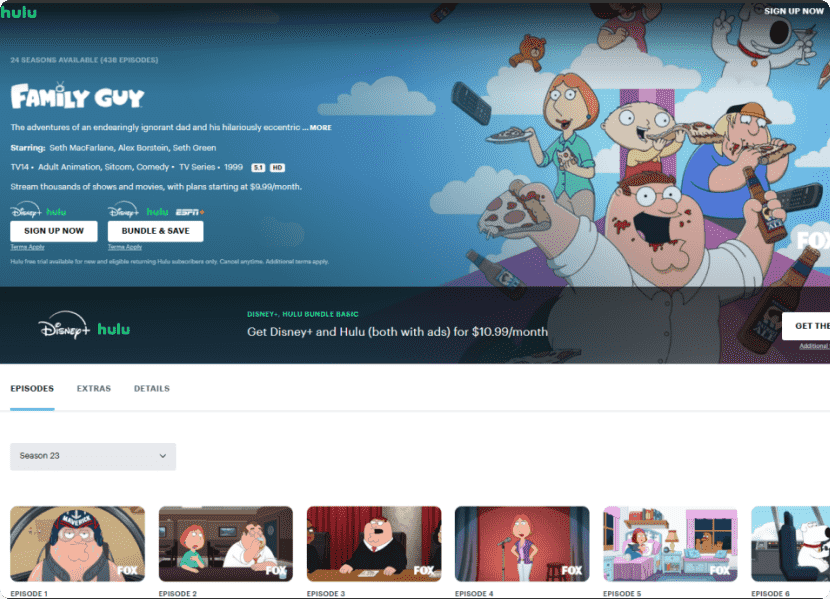
4. Hulu
Paid platforms are safer and they tend to offer a better viewing experience with high-quality definition and full episodes of the latest series. Among those big streaming platforms for movies and series, Hulu is the best one to watch Family Guy at the lowest price.
Pros:
- High Quality
- Full seasons full episodes
Cons:
- Paid ($9.99 a month)
- Unavailable in some countries
- Not that easy to download
Part 2: How to Download Family Guy All Seasons
After testing a few methods, I found a best way for Family Guy complete series download - using iFunia YouTube Downloader. It’s a downloader dedicated for YouTube videos download, but it can also download films, series, and videos from many other websites like Twitter, Facebook, Vimeo, Reddit, and etc.
It supports bulk download full playlist in a few minutes, that means you will download and watch family guy entire seasons offline without being disturbed. Its efficiency and security makes it a strong application for videos, movies and series downloading.
Why iFunia Stands Out for Family Guy Fans:
- Time-Saving: Bulk downloads and background processing let you quickly build a Family Guy library.
- Quality Control: Preserves the show’s humor and crisp visuals with HD clarity.
- Platform Versatility: Supports downloading via link across any sites where Family Guy clips or full episodes might be shared.
- Portability: Works on Mac, Windows, Android (by transferring), you are ready to watch hassle-free on any device, even without Wi-Fi.
How to Download Family Guy Episodes:
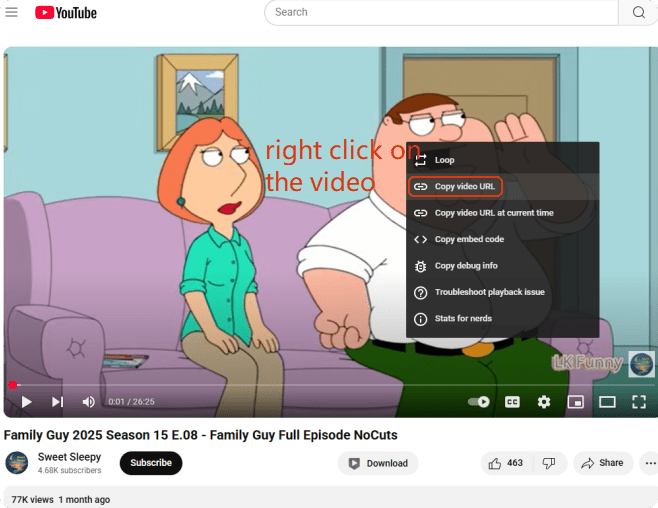
- Copy the episode link address. I’ll take YouTube as an example. Right click on the video and choose “Copy video URL”.
![family guy video download]()
- Free download and install iFunia YouTube Downloader on your Windows or Mac.
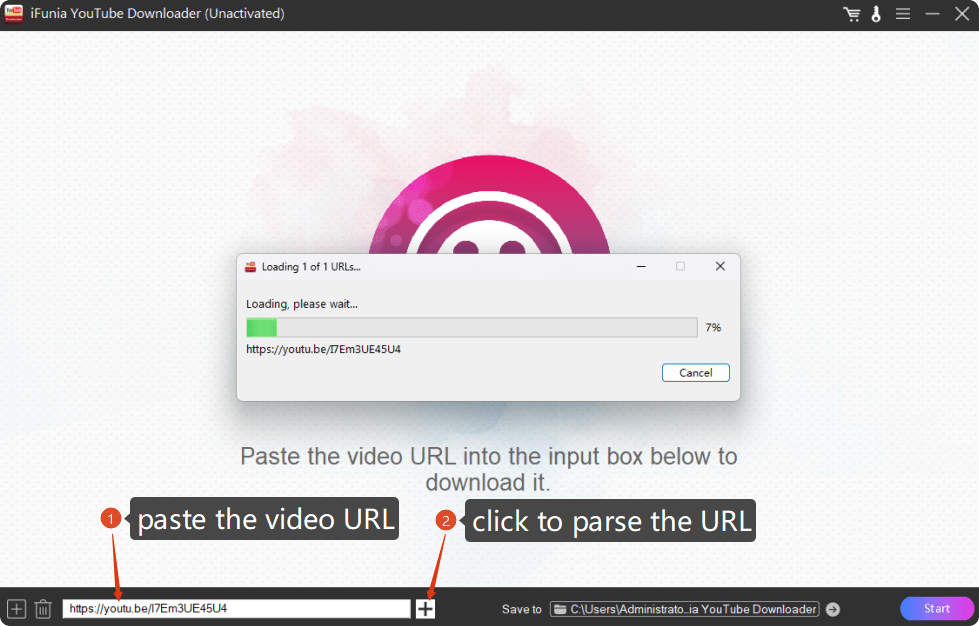
Free Download Windows 10 or later Free Download macOS 10.13 or later - Paste the video URL into the search box and hit the ➕ on the right to load the video into the program.
![free download family guy]()
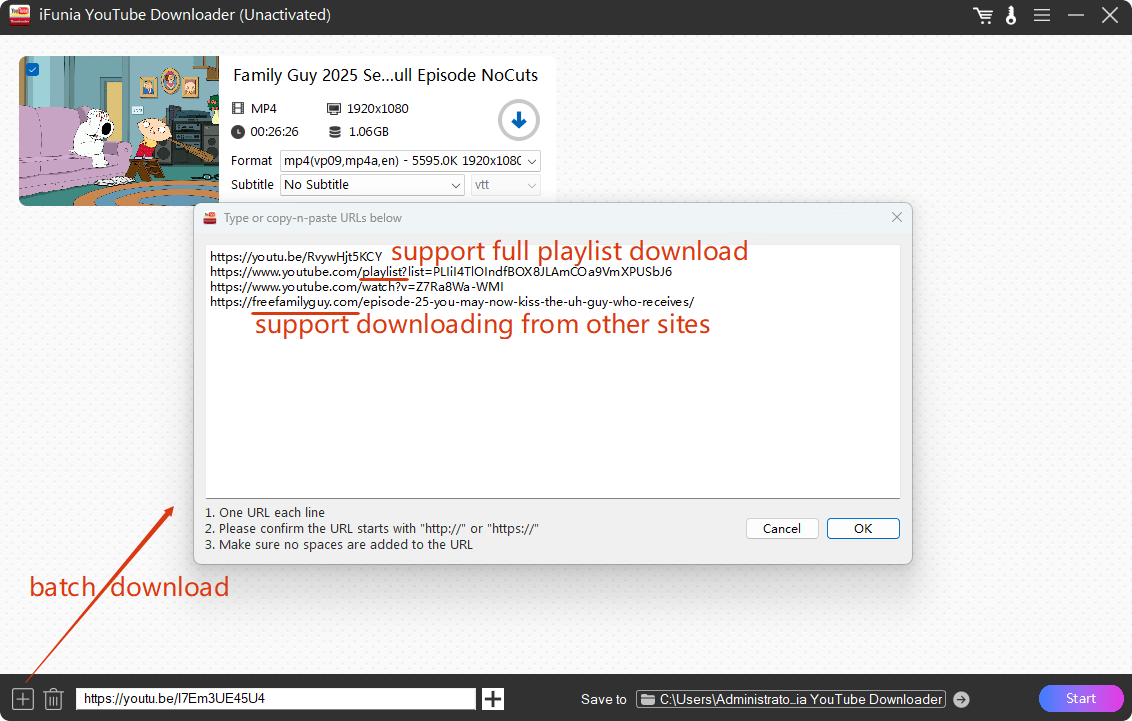
- As for a show with many seasons and episodes, downloading one at a time may take too much time. This is how awesome iFunia is, it can download in batches. Click the ➕ on the left corner and paste all the playlist URL into the dialogue box.
![download family guy episodes for android]()
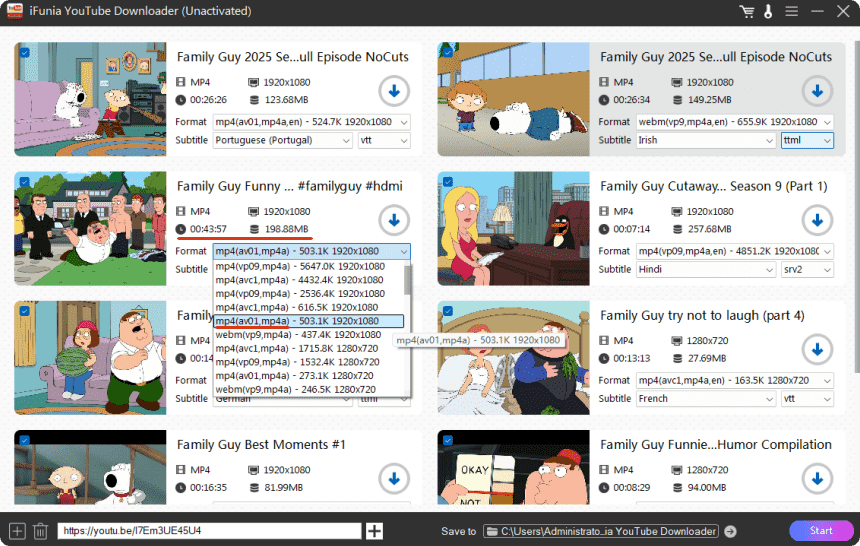
- Once all the wanted episodes are loaded into the software, select a format, a resolution, and a subtitle. In my case, I choose always MP4 with the codec av01 in 1080P, which ensures a high quality and a not-too-big file size.
![download family guy all seasons]()
- Finally, choose where to save these downloaded videos at the bottom and tap the Start button to download free Family Guy episodes.
Part 3: Fun Facts About Family Guy You Might not Know
Family Guy is so popular and rewatchable since no matter how many times you watch the same episode, you always find something subtle that you never noticed previously. Plus, there's enough episodes for you to have as background when busy, once you continue watching you’ll not feel lost. There are many fun facts you might not know about it, if you are interested, keep on discovering.
* Family Guy was Once Cancelled Twice
Although Family Guy is a great success in TV series, it was cancelled twice by FOX. It was not that competitive as other iconic TV shows like Friends and Survivor by the time. But it was revived due to massive DVD sales and fan campaigns, and then returned in 2005.
* Family Guy has comic book version
Yes there’s a comic version of Family Guy, but it lasted only three issues since 2006. It seems that the TV anime version is much more popular than comic books.
However, if you are a big Family Guy fan, you can read the comic issues to find completely original content that had never been seen on TV before. Find on Internet Archive the online Family Guy comic book for free.

* Seth MacFarlane Does Multiple Voices in Family Guy
The creator of the television series Family Guy Seth MacFarlane voices Peter, Stewie, Brian, and Quagmire himself to better interpret their distinct personalities.
* Brian Was Dead and Resurrected by Fans
I don’t know if you remember in season 12, Brian had a car accident and dead. It was replaced by a new dog Vinny. Fans cannot take that and they had intense negative reactions with rage. Finally, Brian came back two episodes later.
* Family Guy Has Won 22 Awards
| Award | Nominations | Wins |
|---|---|---|
| Primetime Emmy Awards | 25 | 9 |
| Annie Awards | 10 | 3 |
| Artios Awards | 6 | 4 |
| Totals | 55 | 22 |
Final Words
That’s it, I hope you know now where to watch Family Guy episodes and how to download full seasons. I prefer YouTube and freefamilyguy.com to watch online, or use the video downloader iFunia every time I want to download Family Guy episodes to watch without Wi-Fi and ad-free.
Kindly note: if you also like Rick and Morty, and One Piece as I do, have a look at these articles I wrote:
HD Rick and Morty All Seasons Download with One Click
How to Download One Piece Episodes English Subbed/Dubbed
Disclaimer
The methods in this article are for personal use only. Before downloading, you must comply with copyright laws and obtain permission from the owner for protected content. The author is absolutely against the downloading of unauthorized video/audio files or using them for commercial gain.

Chloe LEE is good at explaining and solving complex technology problems to her readers. Since joining iFunia Studio, she has focused on writing articles about video and DVD software, and how-to tutorials.
Comments (0)
Leave a Reply