


Best YouTube to WAV Converters in 2026 (High Quality & Safe)




About WAV
Developed by IBM and Microsoft in 1991 as part of the Windows 3.1 operating system, WAV is one of the audio file formats the oldest and most used on PCs. It records the audio information of various single channels and stereos without compression and quality loss.
However, its most significant disadvantage is that it demands too much storage, as it preserves every detail of the original audio.
Why YouTube to WAV Convert?
- WAV’s high quality. WAV is a lossless and uncompressed format that conserves the original audio quality, which will bring a better listening experience for music lovers than other compressed formats like MP3 used by YouTube.
- WAV’s editing advantages. With a pure audio quality, WAV is an ideal format used to edit, mix and insert into films or high-quality videos. Plus, even if it’s edited for several times, it will avoid degrading the quality.
- WAV’s wide compatibility. A lot of editing applications, including old ones, such as MikuMikuDance, and popular ones like Source Filmmaker, need WAV files for audio. Besides, some audio devices require only WAV to mix and synthesize.
- Offline preserving. For professional users, WAV helps conserve the original content. For example, a recording of a concert, the audio of a podcast, the soundtrack of a movie. Enjoying these offline in original quality without ad breaks is a good choice.
Hence, in this article, let’s discover several useful methods to convert YouTube to WAV in Windows.
 iFunia YouTube Downloader
Download YouTube Videos as MP4, MP3, WAV, AAC, etc.
-
Super-fast download speed: With the code and technology that keeps pace with the times, iFunia YouTube Downloader delivers an accelerating real-time download speed of up to 30x.
- Download 1080P, 4K, and 8K videos: It allows you to download videos from SD to UHD quality.
- Support 10000+ streaming sites: You can download videos from the most popular sites, and you can even download a full YouTube playlist and channel.
- Batch download: It's capable of processing multiple 4K 60 fps video song downloads at the same time, which saves you a lot of time.
- Various output options: Before video songs download, you can choose an output format (MP4, MP3), a resolution (from 144P to 8K), and a subtitle (any language option).
- Retain original quality: It enables you to download YouTube videos with original quality effortlessly.
- No ad breaks: Once downloaded, the lossless playback will provide a much smoother viewing experience than online with ads every few minutes.
 Free Download Windows 10 or later
 Free Download macOS 10.13 or later
Reality - YouTube doesn't stream in WAV
Note: YouTube natively streams audio in AAC (Advanced Audio Coding) and Opus. Converting YouTube videos from AAC to WAV will not improve the audio quality compared with original video, but it creates an uncompressed file ideal for lossless video editing and saving.
#1 Best Desktop YouTube to WAV Converter (Safe & Batch Support)
Official Entrance: https://www.ifunia.com/free-youtube-downloader.html
Recommend Level: ⭐⭐⭐⭐⭐
iFunia YouTube Downloader is a 100% safe, stable, and ad-free YouTube downloader and converter. It can easily download videos, playlists, albums, and music from YouTube or 10000+ websites to high-quality WAV, MP4, AAC, FLAC, MP3, MOV, etc.
What impress us is that the app maintains the original video quality and complete metadata information. In our test, iFunia downloaded a 20-minute music video and converted it to WAV in 43 seconds. Also, it is one of the few apps which can really grab a whole YouTube playlist to WAV.
Compatible OS: Windows 11/10, macOS 10.13 or later
Free Download Windows 11/10 Free Download macOS 10.13 or later
How to Download YouTube to WAV on Mac & Windows (Step-by-Step)
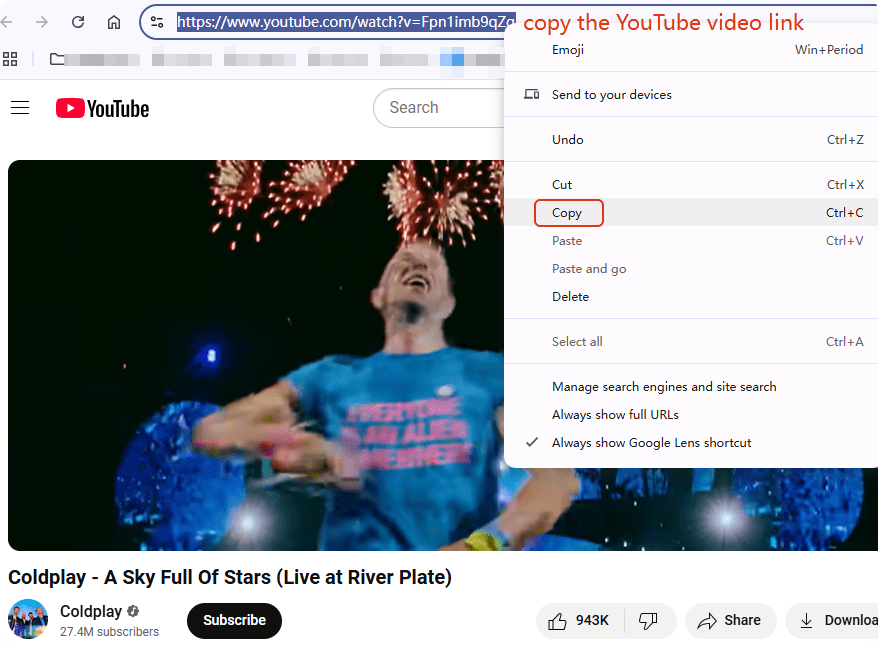
- Head to the YouTube video you want to rip audio from. Copy the video URL.
![how to rip audio from youtube to wav in windows]()
- Paste the URL into iFunia YouTube Downloader.
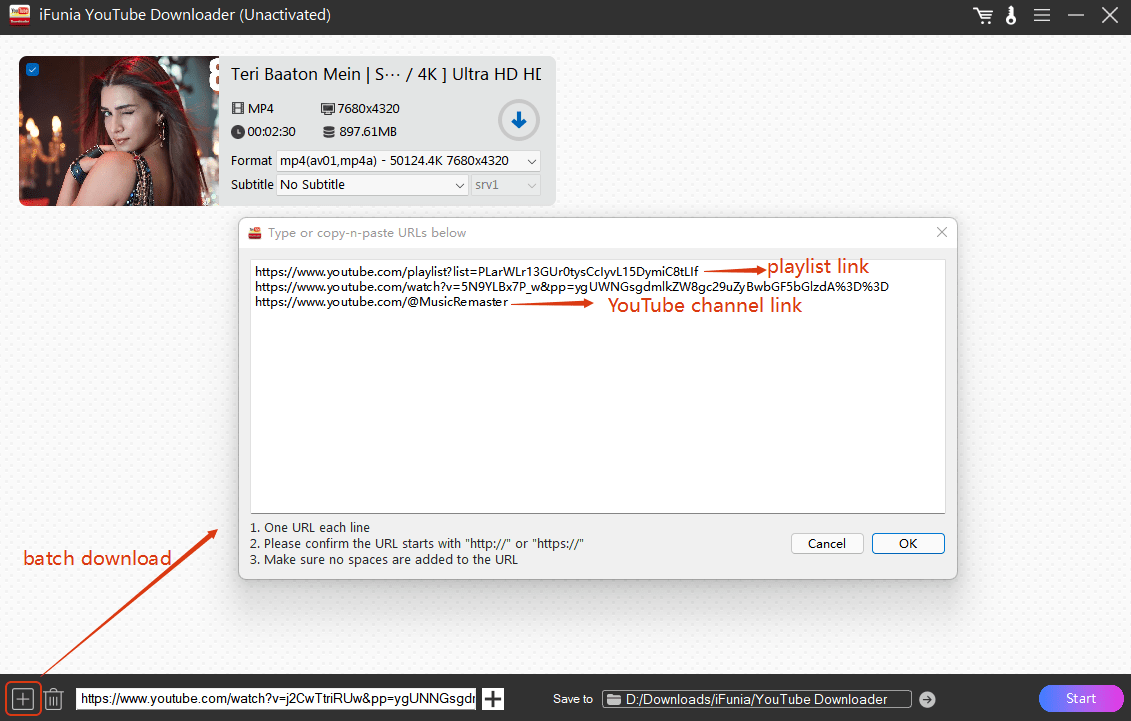
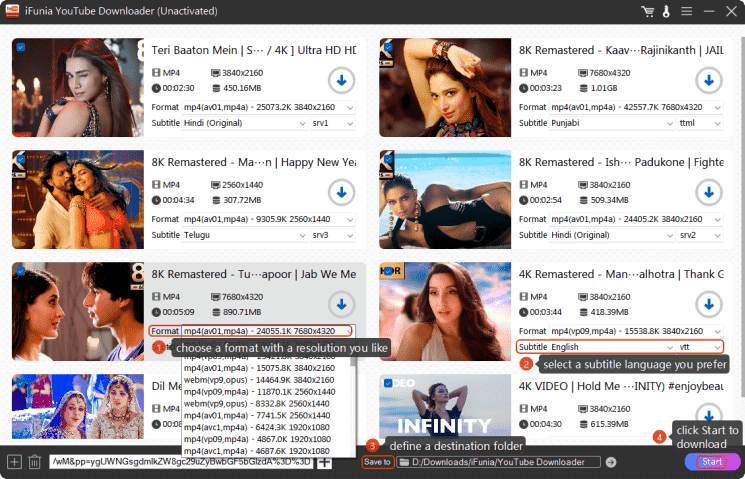
- After that, all the YouTube videos are loaded into the program, select an output format. You can choose to download the video with the music, or rip only the audio in WAV or WebM format. You can also use the format dropdown list to select the output quality as 3840×2160 or 1080p, and the subtitle dropdown option to choose a language you want. Finally, define a path folder, and click Start to save the uncompressed audio file to your computer.
Tips: While iFunia YouTube Downloader is a popular choice, you can also find several other offline YouTube downloaders like Downie, YTMP3, and 4K Downloader by searching online.
#2 Best Online YouTube to WAV Converter (Free & No Installation)
For those who prefer not installing any software, Web-based YouTube to WAV conversion tools also works. After extensive testing and evaluation, we have find sites that really download in WAV and ask no registration. The conversion process for these tools are almost the same.
When to Avoid Online Converters:
- For long videos, playlists or complicated tasks. Because they have limitations on video numbers (e.g., 3 videos/hour) and size (e.g., 100 MB) uploaded, and without batch processing.
- For professional post-production. Since free online servers limit the output quality (e.g., 720p) and compress largely the content to be able to achieve the task.
- For confidential files, such as business content or private recordings. As third-party servers carry information leaks or misuse of sensitive videos.
- Bad internet connection. The websites may crash or have heavy traffic especially for large files.
- Customization needs. No editing tools.
How to Use YouTube to WAV Converter Online:
1. There are tricks using the YouTube to WAV converter Yout.
Trick 1: delete “ube” in the YouTube video link and press the Enter key.
https://www.youtube.com/watch?v=Fpn1imb9qZg
Trick 2: add “yout.com/” before the link and press the Enter key.
yout.com/https://www.youtube.com/watch?v=Fpn1imb9qZg
Trick 3: copy and paste the video URL into the online server, and click GO.
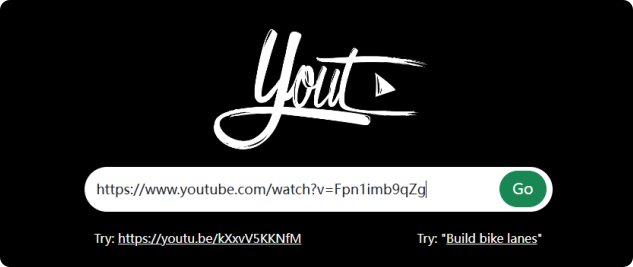
2. It will show you the video information. Choose WAV as the format, you can also change the file name and cut the video length. Then, click Format Shift to WAV to rip the audio from YouTube video to WAV.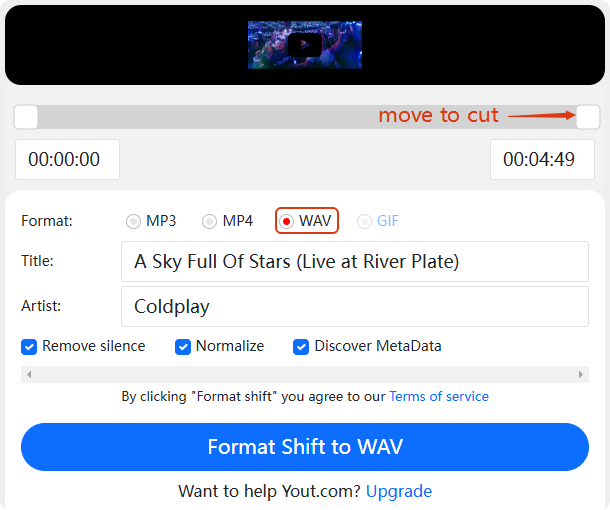
Tips: as online browsers are not stable, if you find Yout not working, try Loader.to.
#3 YouTube to WAV Chrome Extension Recorder
Chrome extensions is also a good way to convert YouTube to WAV format. They are lightweight and fast with a single click while browsing YouTube. As there’s no specified extension to download YouTube to WAV directly, I found a WAV recorder that can record YouTube songs directly to WAV format.
When to Avoid Chrome Extensions:
- For long videos, playlists or complicated tasks. Because it’s time-consuming without batch processing.
- For confidential files, such as business content or private recordings. As third-party servers carry information leaks or misuse of sensitive videos.
- Bad internet connection. The websites may crash or have heavy traffic especially for large files.
- Customization needs. No editing tools.
Guide on Saving youtube to High Quality WAV:
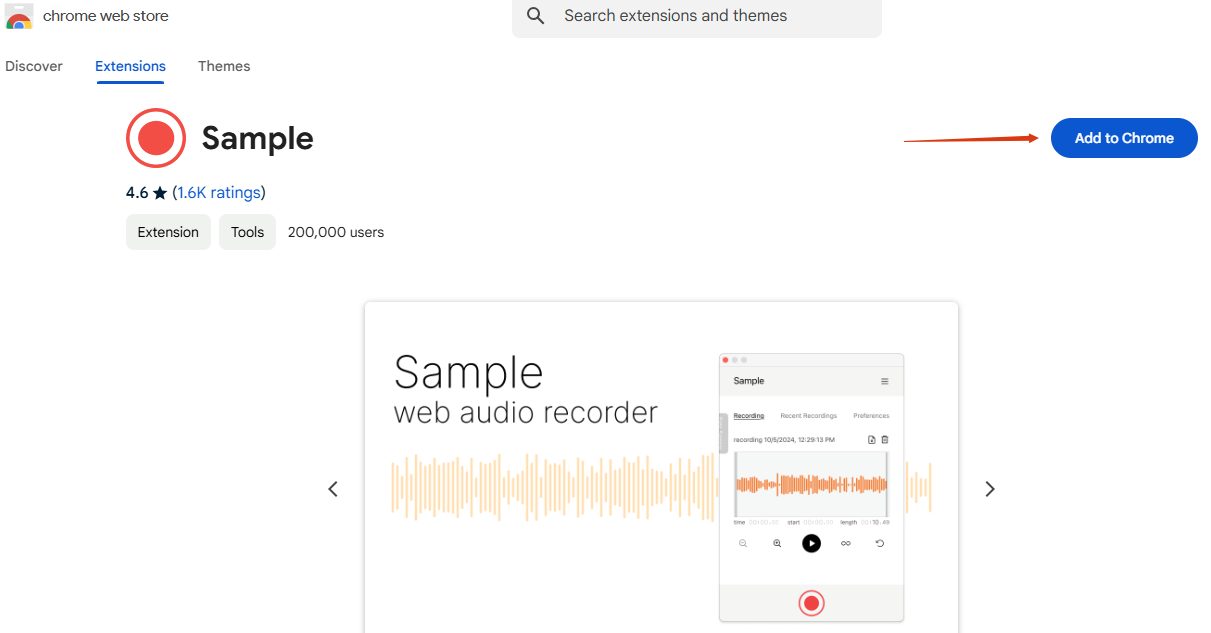
- Navigate to Chrome web store and search for Sample. Add it to Chrome.
![youtube to wav converter free]()
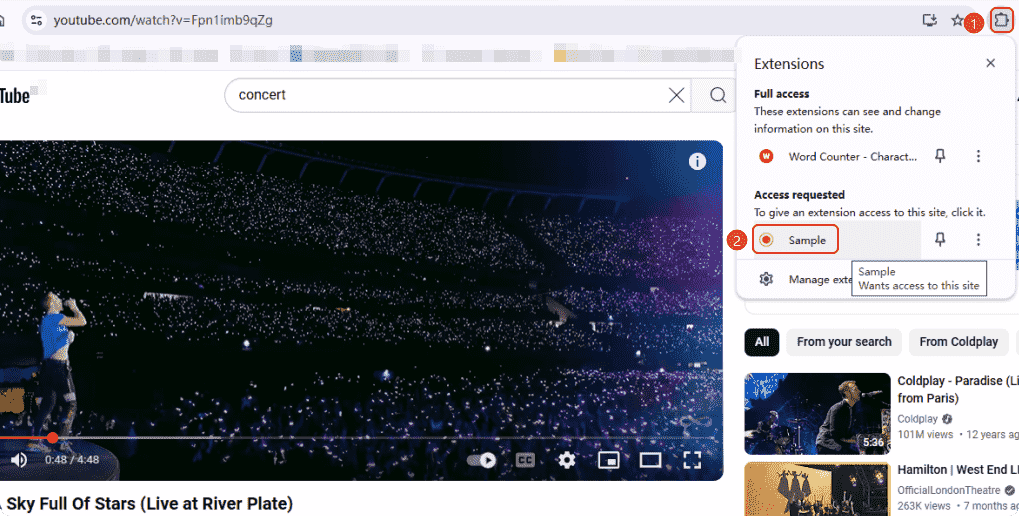
- Go to the YouTube video you want to rip the audio and play it. Hit on the extension icon in the upper menu and select Sample.
![youtube to high quality wav]()
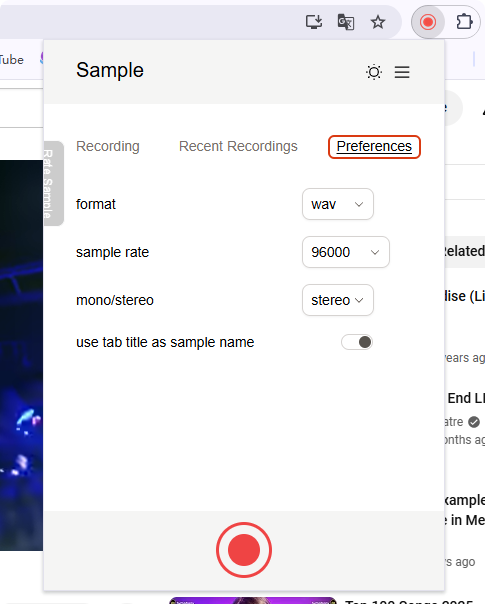
- In the popping up window, switch first to Preferences to set up the format and sample rate you want. Then move to the Recording part.
![youtube to wav coverter]()
- Press the red button to start the recording and tap it to stop as well. After it’s recorded, click the download button to have the WAV file.
![youtube to wav chrome extension]()
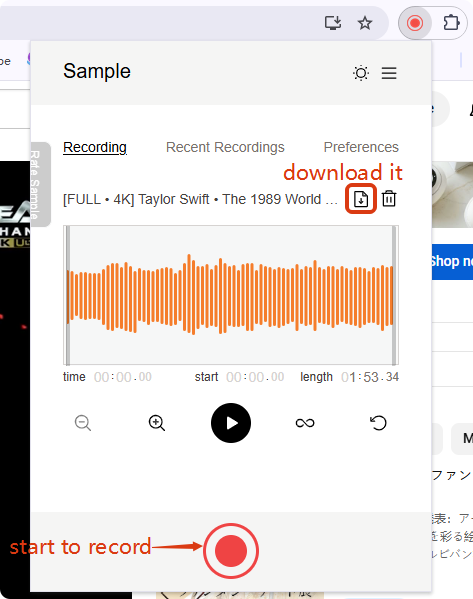
Tips: you can also use professional audio recorders like Audacity or OBS to record the YouTube songs into WAV files.
Some Interesting Facts About WAV
Why called WAV?
The name “WAV”is from “waveform” like sound waves. Some think it’s “Waste of Audio Virtue” because of its large file size.
WAV is super compatible.
It’s compatible with almost every device and software, even smartphones and game consoles.
Windows startup sound’s in WAV.
You can find the startup sound in WAV format named “startup.wav” in your system folders from Windows 95 to XP.
NASA uses WAV format in space.
Some audio on Mars recorded by NASA were transmitted in WAV format due to its reliability and precision.
How to play WAV files on Mac?
You can play WAV files on iTunes or iFunia Media Player, which can be used as a media player and file transfer tool.

Chloe LEE is good at explaining and solving complex technology problems to her readers. Since joining iFunia Studio, she has focused on writing articles about video and DVD software, and how-to tutorials.
Comments (0)
Leave a Reply