


How to Download YouTube Videos with Multiple Audio Tracks (Original + Dubbed) in 2026




Summary: YouTube’s multi-language audio tracks are a fantastic feature for watching dubbed content online. But most downloaders - and even YouTube Premium - will only save the original audio track, completely ignoring the dub you actually want to hear. Find real ways to download youtube video with multiple audio tracks.
Following the expansion of auto-dubbing, YouTube rolled out multi-language audio tracks feature in September 2025. As viewers, we can watch dubbed YouTube videos with the selected audio track online, but how can we download them to watch offline with the correct audio?
If you try, you’ll find that both YouTube Premium and online tools can only download the original audio; no dubbed versions to choose from. Don’t worry, this guide will show you how to download YouTube video with multiple audio tracks using 3 different tools.
Table of Contents
- What Kind of Audio Tracks Can You Actually Grab in 2026?
- Method 1: iFunia YouTube Downloader - Easy And Quick Solution
- Method 2: JDownloader 2 - Free Download Manager
- Method 3: yt-dlp – Grab the Specific Audio Track You Want
- Final Words
What Kind of Audio Tracks Can You Actually Grab in 2026?
- Original language (Japanese raw, English studio audio, etc.)
- Dubbed – official secondary languages added by the channel (Spanish, Hindi, French, German, Portuguese, Russian – you name it)
- Default – whatever YouTube thinks you should hear
1. iFunia YouTube Downloader - Easy And Quick Solution
iFunia YouTube Downloader is a dedicated video downloader with superior multi-audio support. It’s very easy to use and allows you to download dubbed videos with the right audio tracks in original quality. Apart from YouTube, it also support numerous websites such as Vimeo, Tubi, Arte.tv, Dailymotion, Twitch, etc.
iFunia YouTube Downloader detects every audio tracks automatically and lets you:
- Download only the original (the #1 request from anime and movie fans)
- Download only a specific dub (great for language practice)
- Download all the available audio tracks in batches
More Features:
- Support audio-only formats
- Support for video resolutions (up to 8K) and subtitles selection
- Maximum download speed
- Batch download videos, playlists and whole channels
- Support cookies to download private and age-restricted videos
- Intuitive interface, no ads, no extra plugins
- Technical support
This powerful video downloader offers a free trial version that lets you save 3 videos at 0 cost. Download it now and follow steps below to download YouTube videos with the audio track of your choice.
 Free Download Windows 10 or later
  Free Download macOS 10.15 or later
- Download and install iFunia YouTube Downloader on your Windows or Mac computer.
- Go to YouTube and copy the URL of the dubbed video you want to download.
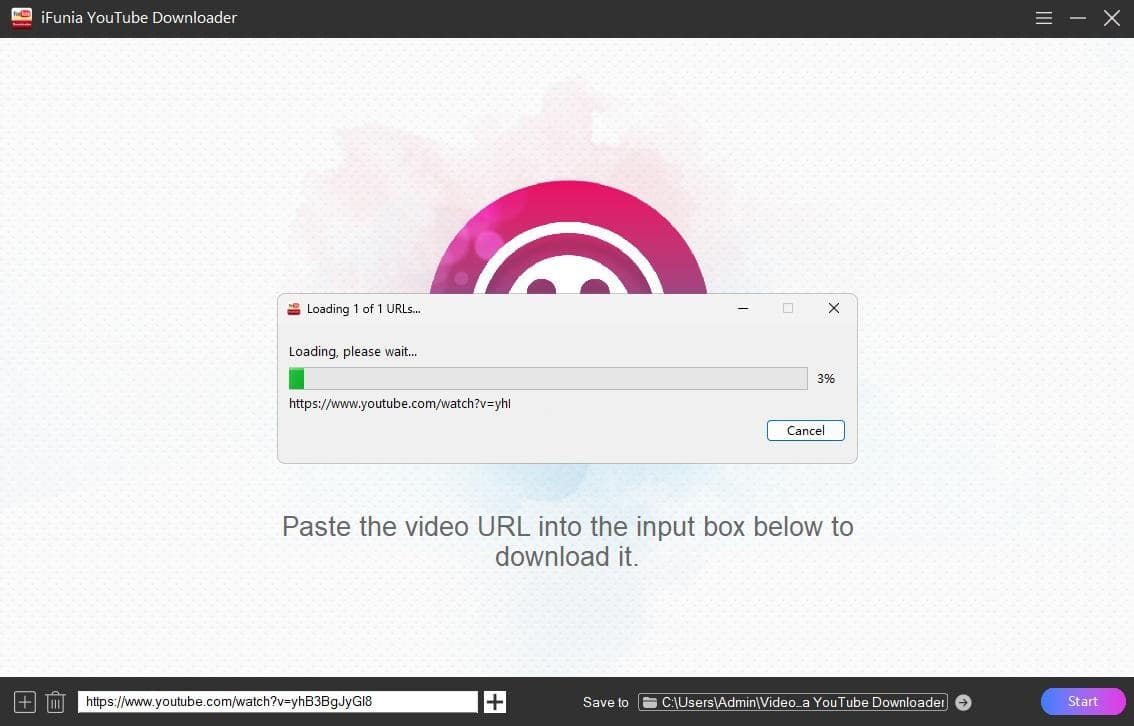
- Paste the video URL into the bottom box, then click the + button on the right to load it.
![load url]()
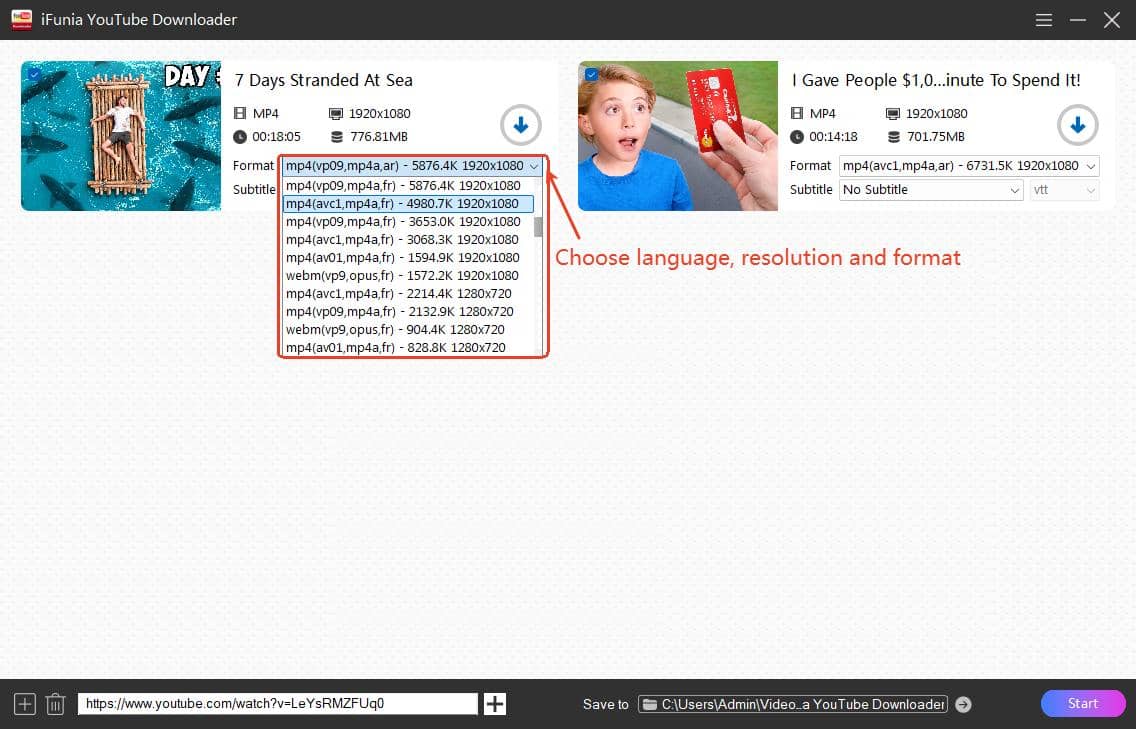
- The Format drop-down list displays all variants of the video by language abbreviations. Select one with your preferred audio language, quality level, and format.
![download video with selected audio track]()
- Click on the Start button to begin the download process. When the download is finished, click the blue check icon to locate the file in folder.
Tips:
- MP4 format with 'avc' video codec and 'mp4a' audio codec is the most compatible format if you want to ensure the downloaded video can play on the default players.
- Click the 'Save to' box at the bottom to select the output location, make sure there is enough space to store the downloaded files.
- Click the Add icon in the bottom left corner to add multiple URLs and download them at once.
- If you want to download a YouTube video with multiple audio tracks, you may download other audio files separately in iFunia and then merge to the video with an editing tool.
2. JDownloader 2 - Free Download Manager
JDownloader 2 is a powerful and free download management tool that can rip various media content from website such as YouTube, including the video, audio, srt subtitle, thumbnail, and description. It even support playlist URLs. There are drawbacks though. The client contains adware and the user interface is a bit complicated to master for beginners. And there seems to be an ongoing bug with YouTube downloads.
Steps to download YouTube videos with specific audio tracks for free:
- Download the setup file of JDownoader from its official site, it’s compatible with Windows, Mac and Linux. Run the setup to install it on your computer.
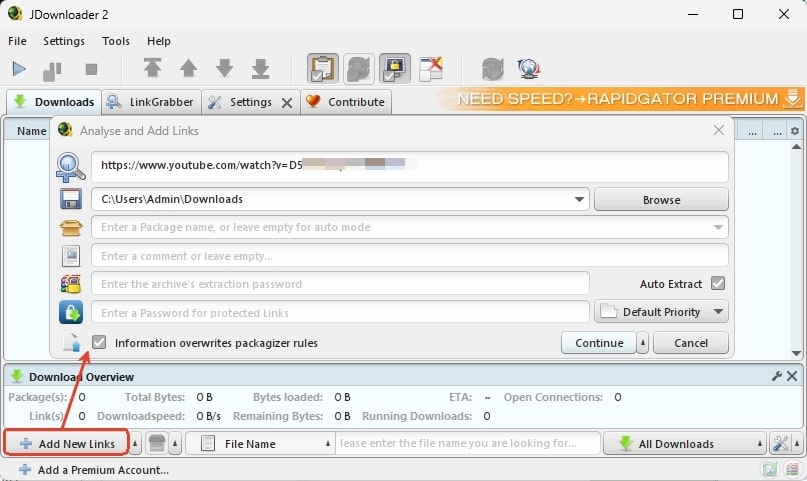
- Run the app, click 'Add New Links' at the lower left to paste the YouTube video link, and click Continue to the video.
![jdownloader2 add video link]()
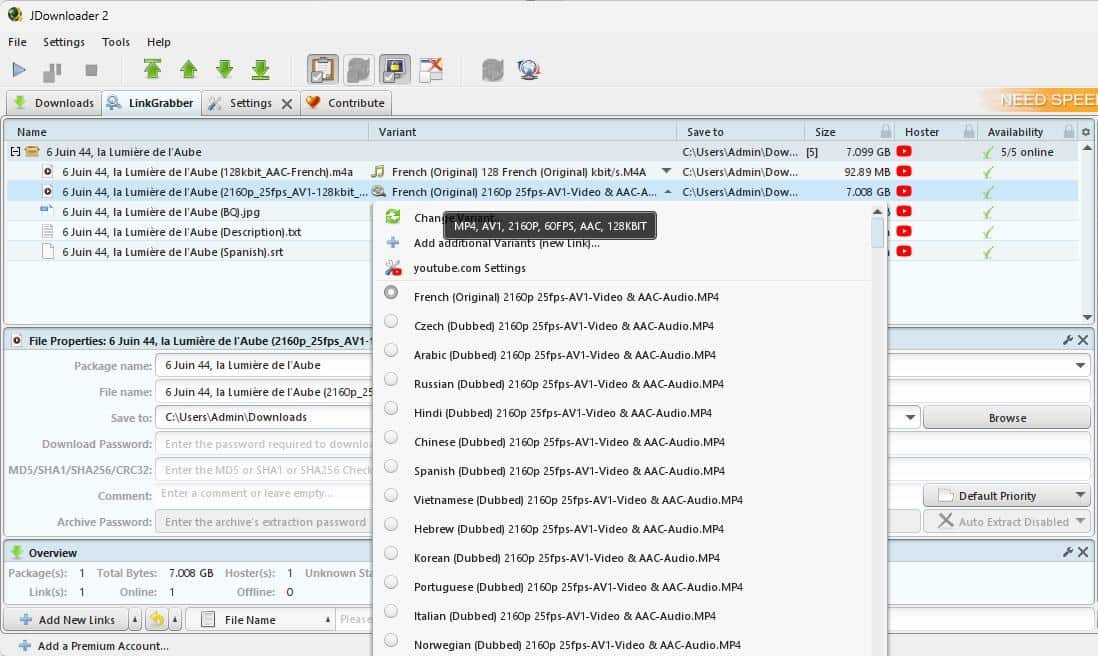
- Click the Variant drop-down icon of the video file, and select the download option of specific language and resolution.
![select video variant]()
- Right-click on the entry and select Start Downloads. Note that If you’re using it to download YouTube videos for the first time, you’ll be prompted to install FFmpeg plugin to merge audio and video streams.
Troubleshooting: If you can only get one video quality (360p) without language options
Sometimes JDownloader only offers the 360p video option with no language selection when downloading from YouTube, for unknown reasons. If you encounter this issue, try the following fixes:
Fix 1. Uninstall and reinstall JDownloader 2.
Fix 2. Use a proxy server to change your IP address.
Fix 3. Check for updates.
Fix 4. Use another workable tool such as iFunia or yt-dlp.
3. yt-dlp – Grab the Specific Audio Track You Want (2026 Commands)
If you are comfortable with the command line, yt-dlp is the most powerful free method available. It's a free, open-source tool for downloading videos, but it requires FFmpeg to merge video streams with audio tracks. The best part of it is that you can save multiple audio tracks into one video.
2026 WARNING – Default Audio Is a Trap!
YouTube now auto-selects dubbed tracks for many users based on region. If you just run a basic yt-dlp command on a multi-language video, it will likely download the wrong language or compress the audio. Furthermore, YouTube now offers multiple quality levels and "DRC" (Dynamic Range Compression) versions for each language, which clutters the download list. So, never run plain yt-dlp on a dubbed video in 2025, the basic yt-dlp command will download the wrong language 70 % of the time.
The Solution: The "Catch-All" Command
Instead of manually looking up individual audio IDs for English, Spanish, Japanese, etc., yt-dlp maintainers recently shared a brilliant command (via GitHub Issue #15256) that automatically grabs the best video quality and merges it with the highest-quality audio stream for every available language—skipping the low-quality duplicates.
- Install yt-dlp and FFmpeg on your computer. The installation process varies depending on your operating system.
- Open Command Prompt (Windows) or Terminal (Mac) to run yt-dlp.
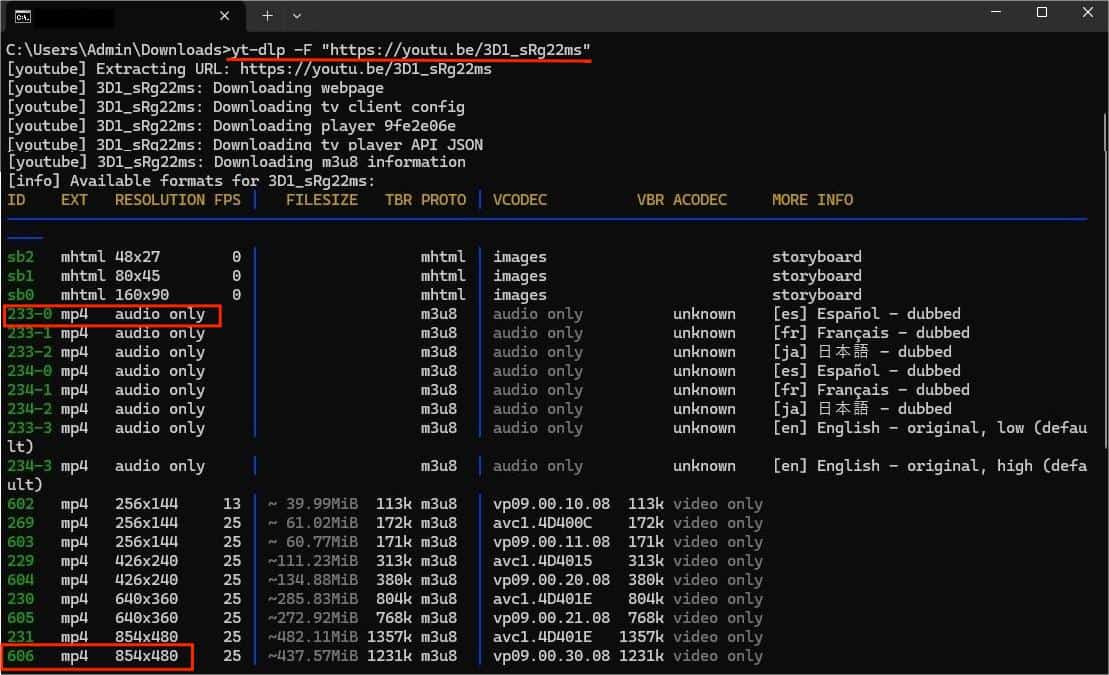
- Type cd PATH and press Enter to designate an output location, such as cd desktop.
![yt-dlp list formats]()
- To download a multi-language video with all the best audio tracks automatically included, paste the following command, replacing "URL" with your YouTube link:
yt-dlp --audio-multistreams -f "bv*[vcodec^=avc]+mergeall[acodec^=opus][tbr>=120][format_id!$=-drc]" "URL"![yt-dlp download yt video with multiple audio tracks]()

- audio-multistreams: Tells yt-dlp to package all the selected audio tracks into one video file.
- bv*[vcodec^=avc]: Grabs the best video stream using the widely compatible AVC codec.
- mergeall[acodec^=opus]: Selects all the Opus audio streams (which YouTube uses for its high-quality multi-language tracks).
- [tbr>=120]: Filters out the low-quality audio streams (ensuring you only get the 120kbps+ versions).
- [format_id!$=-drc]: Ignores the duplicate "Dynamic Range Compression" audio tracks that YouTube generates, saving you file space.
(Optional) Want just ONE specific language?
If you don't want every language and just want to manually pick one (e.g., just the Spanish dub), you can still run yt-dlp -F "URL" to view the list of available audio IDs. Then, run:
yt-dlp -f [Video-ID]+[Audio-ID] "URL" (Example: yt-dlp -f 137+251-es "URL").
Final Words
YouTube has been rolling out multi-language audio feature since 2023, and it’s still only accessible to certain creators. There are two types of dubs: the one recorded and uploaded by creators and the auto-dub generated by YouTube. The latter may contain errors and the tone may sound weird. No matter which kind you want to download, the method is the same, using powerful third-party downloader.
If you want a user-friendly option, iFunia YouTube Downloader is the best way to go, providing the fastest download speed and a clear interface. If you prefer a totally free option, try JDownloader 2, or take some time to set up yt-dlp.
Disclaimer
The methods in this article are for personal use only. Before downloading, you must comply with copyright laws and obtain permission from the owner for protected content. The author is absolutely against the downloading of unauthorized video/audio files or using them for commercial gain.

Chloe LEE is good at explaining and solving complex technology problems to her readers. Since joining iFunia Studio, she has focused on writing articles about video and DVD software, and how-to tutorials.
Comments (0)
Leave a Reply