


YouTube to OGG Converter – Fast, Free & High Quality




What is OGG?
Designed by Xiph.Org Foundation, the format OGG is an open-source and patent-free media container for audio, video, subtitles and other data storage. It encodes audio using codecs Vorbis, Opus, FLAC, and video using Theora. As MP3, AAC and other formats becoming more supported, OGG is less popular. However, OGG still has its place nowadays.
Why People Want to Convert YouTube Video to OGG?
Although OGG is not mainstream like MP3 or WebM, converting YouTube videos to OGG remains important for lots of users.
- Open source: no software patents restrictions, which is a good option for developers, projects like gaming engines, and system like Linux.
- Efficient compression: with codecs Opus and Vorbis, OGG can save videos in better audio quality and smaller file size than MP3. This is perfect for YouTube archival purposes.
- Specific compatibility: some software, devices and special apps support only OGG format.
- Post-production: many users may download the YouTube videos to OGG and edit the audio on programs like Audacity. The format’s open nature helps manipulate without proprietary software.
- Offline watching: download and YouTube videos to your devices and you can watch the videos anytime anytime without frequent ad breaks.
So, this post will cover several useful and professional YouTube to OGG converters that can download and convert YouTube to OGG audio.
 iFunia YouTube Downloader
Best YouTube Video Downloader for Mac and Window
- Download videos from YouTube, TikTok, Facebook, Instagram, BitChute, Pinterest, and other 10000+ websites.
- Batch Download: Allows downloading multiple videos at once.
- Download age-restricted YouTube videos, blocked videos, private or unlisted videos, playlists, and channels.
- Save video in 1080P, 4K, 5K, 8K or higher quality.
- Save videos as the most popular MP4, WEBM, MP3, etc.
- Batch download videos at 6X faster speed.
- 6x times faster download speed.
- No plugs or ads.
- Safe and easy to use.
 Free Download Windows 10 or later
 Free Download macOS 10.13 or later
Quick Comparison: Which YouTube to OGG Converter Should You Choose?
To give you a quick overview of the best solutions to convert or download YouTube to OGG, here’s a comparison table highlighting key aspects of each tool.
| YouTube to OGG Converter | Key Feature | Free or Paid | Difficulty | Drawbacks |
|---|---|---|---|---|
| iFunia Free YouTube Downloader | Download YouTube videos as MP3, MP4, OGG, etc. with high quality, supports playlist downloading, and has no ads | Free trial | Easy | Not as fast as the others, but it offers high-quality audio output |
| Any Video Converter | Downloading YouTube videos and offer features like video merging, compressing, recording, video cropping, etc. | Free trial | Easy | Bothersome ads |
| TubeRipper | Online YouTube to OGG converter | Free | Medium | Bothersome ads |
| UKC.com.np | Online YouTube to OGG converter | Free | Easy | Slow downloading speed |
| VLC | Free YouTube to OGG converter recommended by reddit users | Free | Hard | Failed everytime in our testing |
#1 iFunia YouTube Downloader (Simple "Copy Paste" desktop app)
My first option was iFunia YouTube Downloader. It lets you download and save YouTube videos in original quality and offer popular downloading formats. I find it especially good for downloading a whole YouTube playlist, so you dont need to download videos one by one.
Best for: People who want a simple "Copy Paste” desktop app and download a whole playlist in one go.
Steps to Convert YouTube Video to OGG:
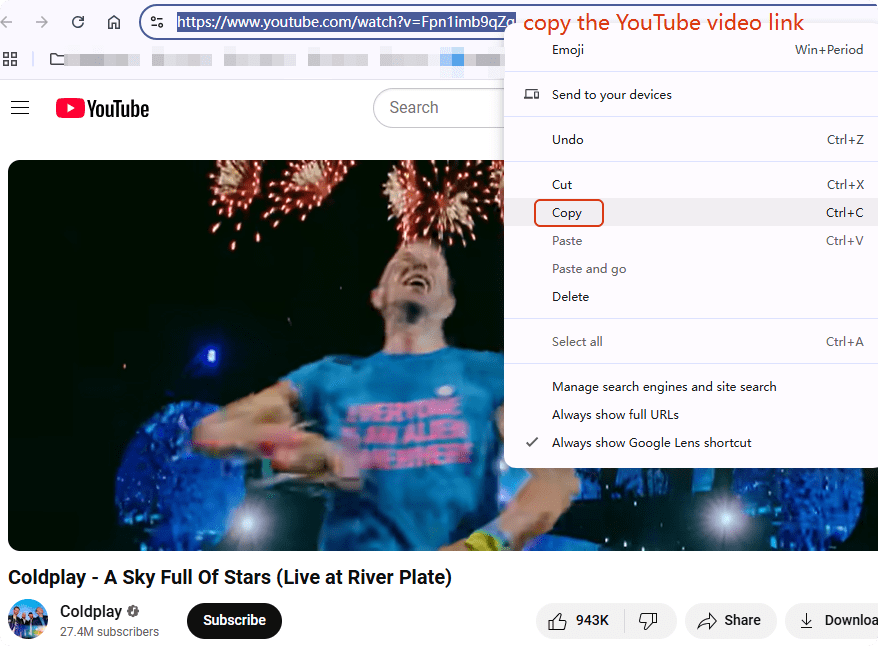
- Navigate to the YouTube videos you want to download and convert to OGG files. Copy the video link address. Plus, as it supports a whole playlist download, so copy the playlist link if you need.
![youtube to ogg converter]()
- Free download and install iFunia YouTube Downloader on Mac/Windows.
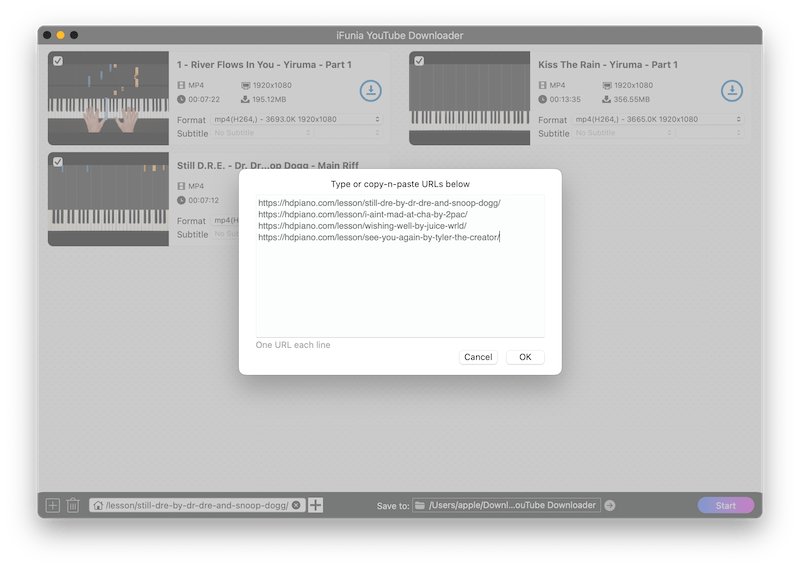
Free Download macOS 10.13 or later Free Download Windows 10 or later - Copy and paste the link of your video into the app.
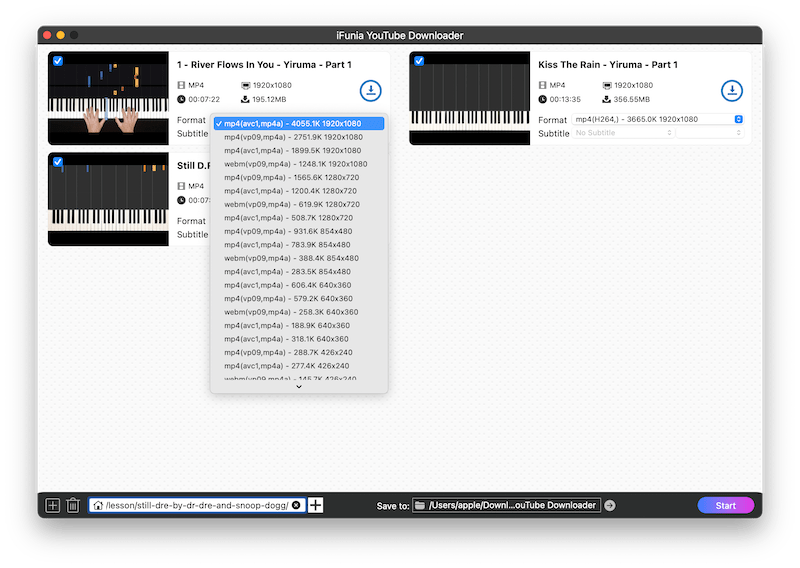
- Within a few seconds, iFunia Free YouTube Downloader will list all the added videos and show the available output formats and quality. Choose the ouput format as MP3 or OGG, and a video quality you prefer.
- Click the Download button to begin downloading the YouTube video as OGG.
#2 Alternative YouTube to .OGG converter - Any Video Converter
If you tried iFunia Video Converter and don’t like it, never mind, try an alternative . Any Video Converter is also my go-to tool for video converting and downloading for years. It’s free and easy to use with rich features such as video merging, compressing, recording, add audio or watermark, video cropping, etc.
However, it has disadvantages too:
- Limited formats compared to iFunia.
- Much less quality options.
- Not as fast as iFunia.
YouTube Link to OGG Tutorial:
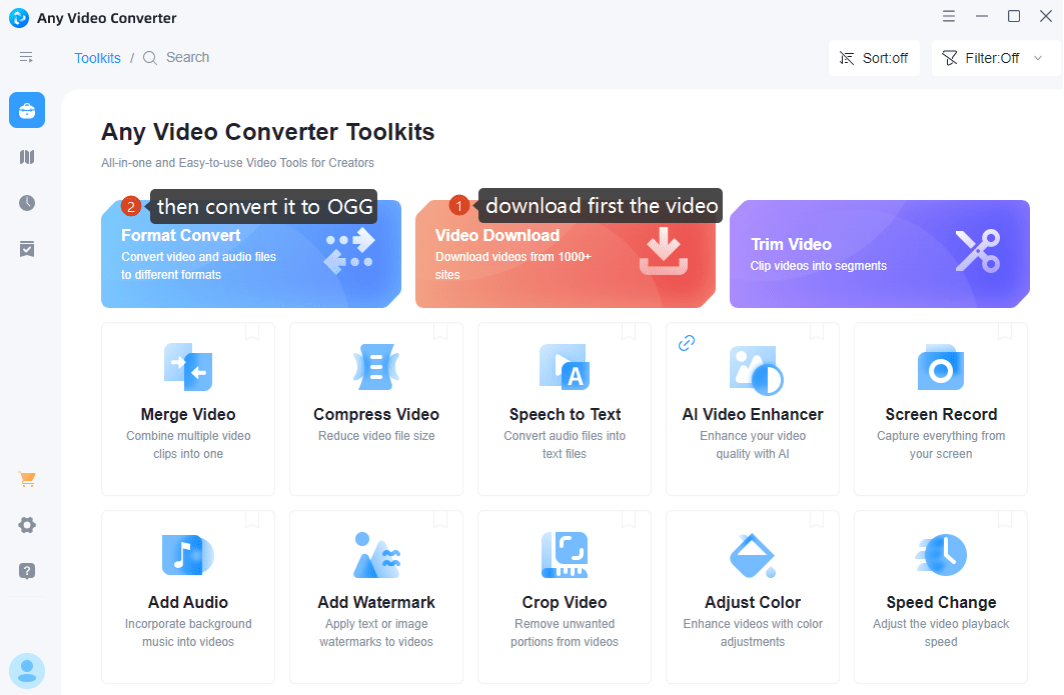
- In the software, Copy and paste the YouTube video URL into the Video Download tool.
![youtube to ogg converter free]()
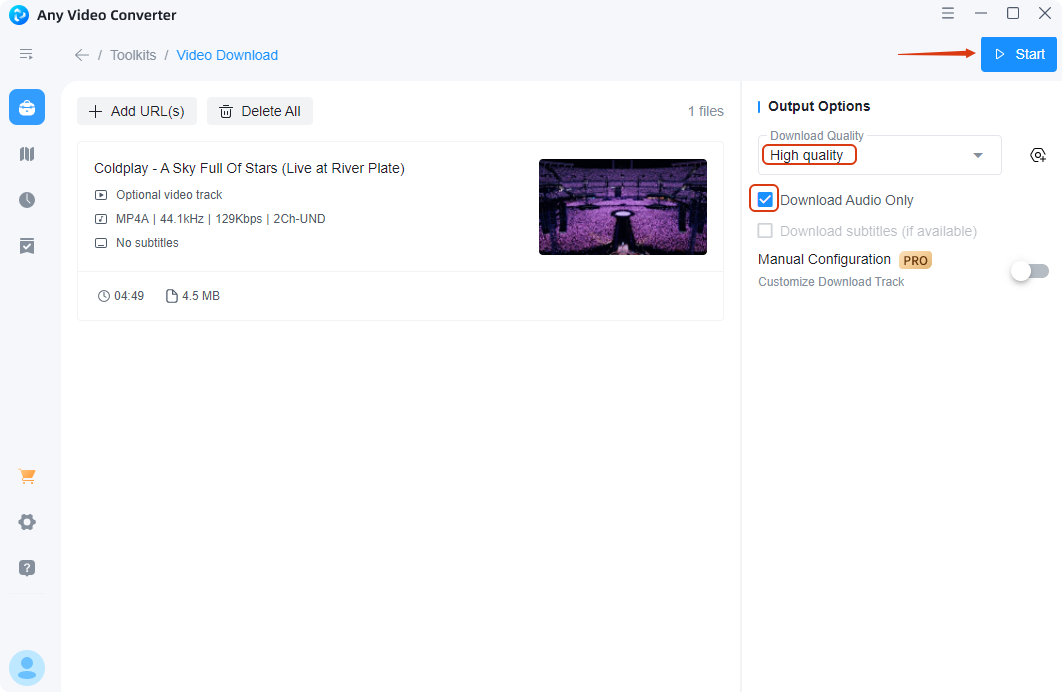
- Click Analyze and the video will be displayed. Choose a download quality and check to Download Audio Only. Then, click Start.
![youtube to ogg free]()
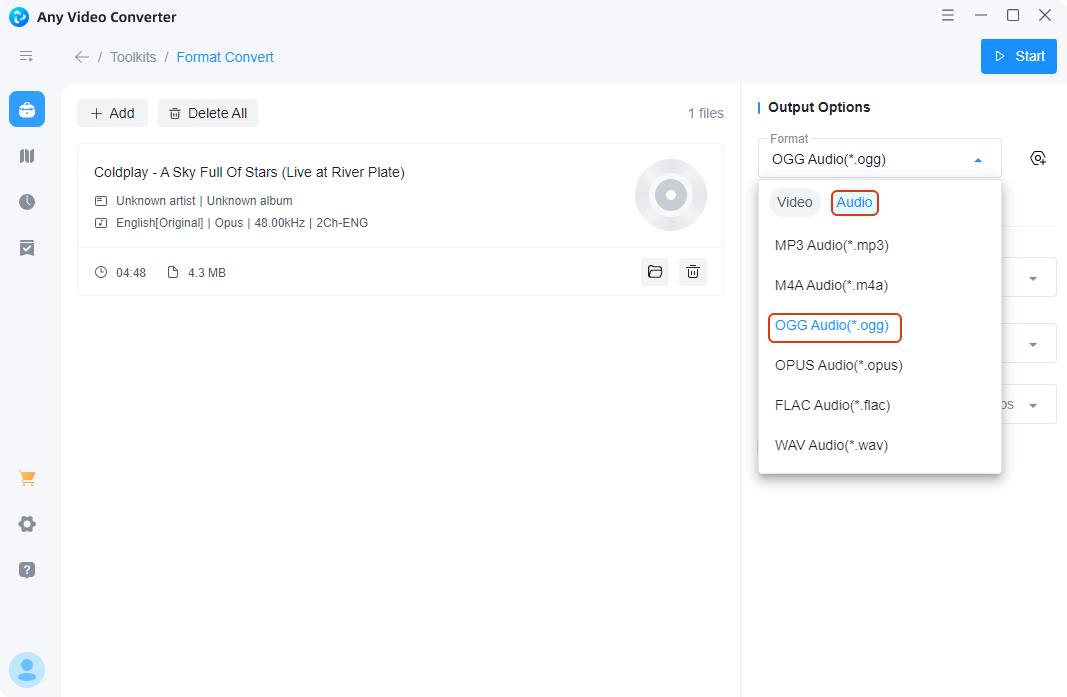
- Now, move to the Format Convert tool from the home page. Drag the file downloaded from YouTube, choose OGG as the output format and set up other options. Finally, hit on the Start button.
![youtube to ogg downloader]()
#3 YouTube to OGG Converter Online
If you don’t want to install any software, online converters are a good idea for YouTube convert to OGG, as they are convenient and accessible from any device with a browser. They're usually free and simple to use for small tasks like converting a single file.
However, let’s not ignore their drawbacks:
- Limitations on file size and output quality.
- Unreliable as the server depends on the Internet connections.
- Slow speed for large files.
- Annoying ads may expose users to malware.
- Privacy risks as it’s not secure to upload files to third-party servers.
#3.1 TubeRipper
Guide to Convert YouTube to OGG Online:
- Browse to the online YouTube to OGG converter TubeRipper.
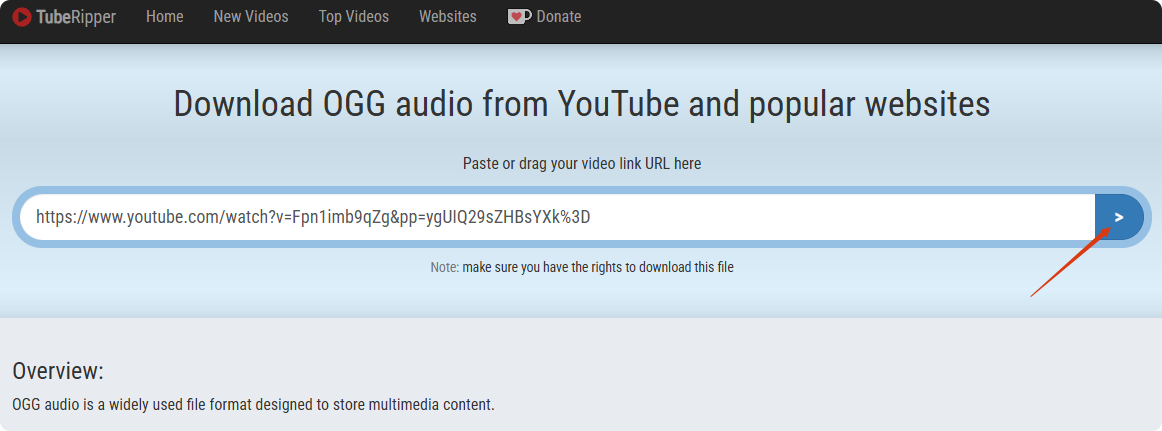
- Copy & paste the video URL into the search bar, and click the arrow or press on Enter key to load it.
![youtube to ogg converter online]()
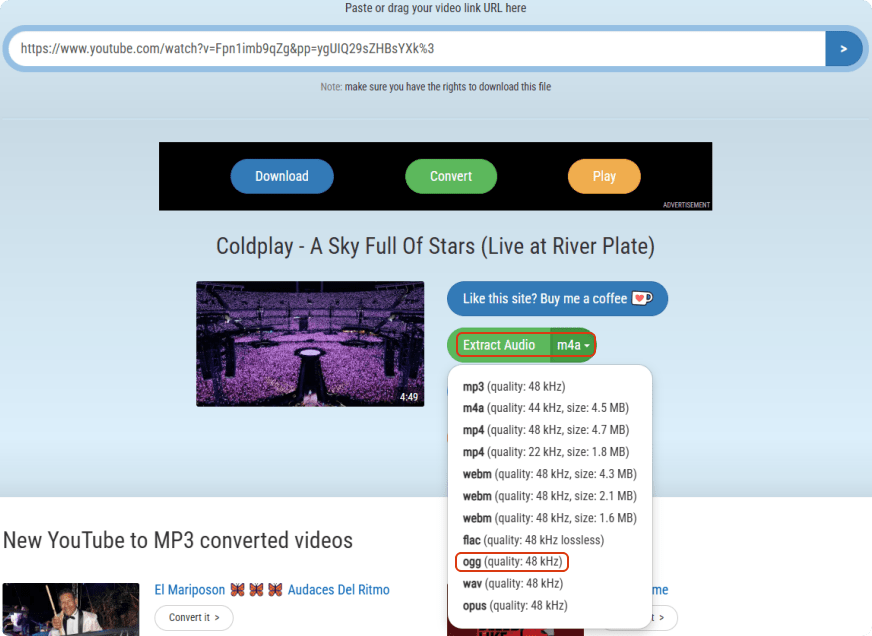
- Select Extract Audio and choose OGG as the output format. Then, it will download and convert directly the YouTube video to OGG format, and save it to your device.
![convert youtube to ogg online]()
Note: every time you click on the page, it will direct to a page including ads or asking to install other software, don’t click on any of them, just close it and get back to the original page.
#3.2 UKC.com.np
Online converters are not stable and often taken down due to various factors, so I leave this site as an alternative to you if the first one doesn’t work.
The steps are similar:
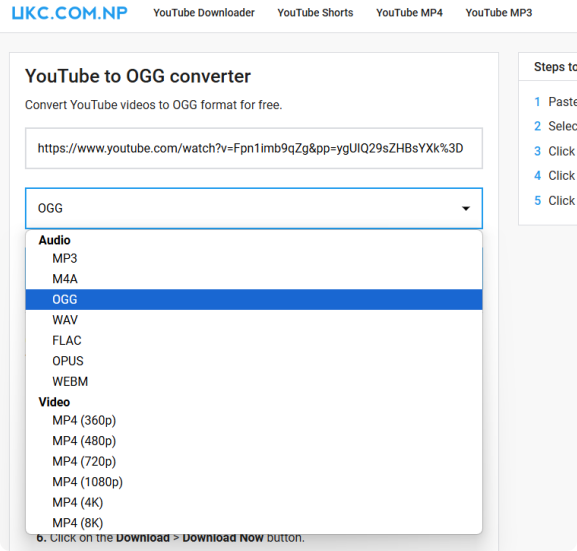
- Browse to the site of UKC.com.np.
- Copy and paste the YouTube video link into the search bar, choose OGG and get the link for YouTube link to OGG file.
![youtube to ogg online]()
Problems You May Encounter
How to Play OGG Files?
Music players and software such as Audacity, VLC, Windows Media Player, even cloud service Google Drive to open and play OGG files.
Why Choose OGG Instead of MP3?
Real-time conferencing tools like Zoom often use the OGG container because of its minimal delay in data processing; this may offer a high audio quality. What’s more, as OGG is patent-free and royalty-free, users tend to use OGG to avoid proprietary formats due to licensing concerns.
WAV = A free and open-source audio format that offers a better sound quality and smaller size than MP3
MP3 = lossy compression (larger files for same quality OGG)
OGG files are better for:
- Modern streaming
- Audio editing
- Supports multiple streams: audio, video, text, and subtitles all in one file.
- Supports advanced metadata for detailed tagging.
- Utilizes advanced compression algorithms, which adjust the bitrate based on how complex the audio input is.
What Converter Can I Use If I Have the YouTube Videos?
If you already have the YouTube videos, try this online OGG converter. It supports mass convert to OGG. Hence it’s a perfect tool to quickly convert from a variety of source formats to OGG.
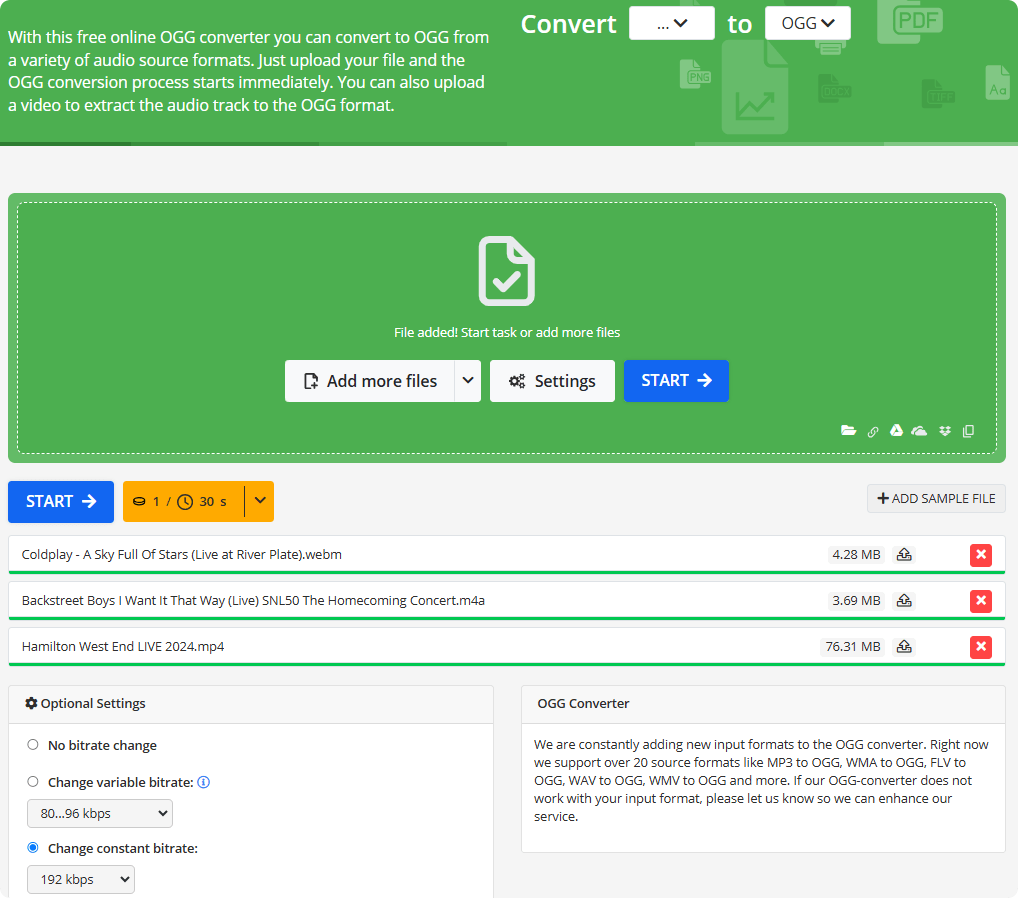
Besides, if you want an desktop OGG converter, try Audacity.
Can VLC Be a YouTube to OGG File Converter?
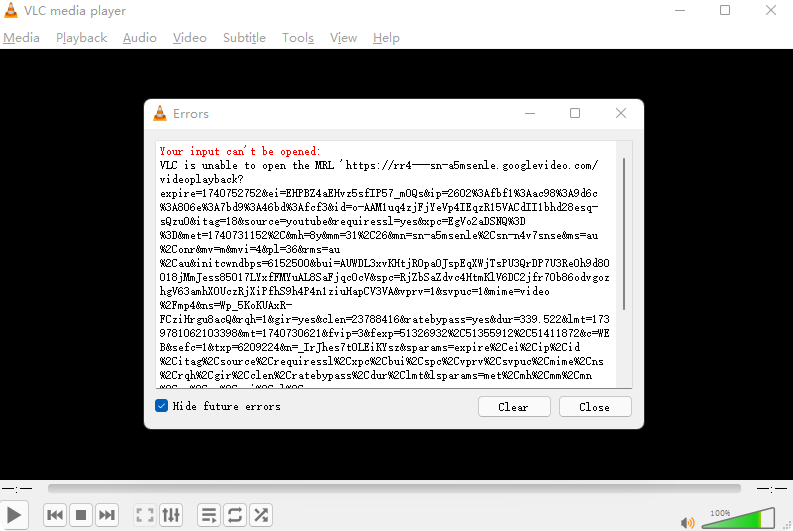
I saw on forums that some users convert YouTube video to OGG via VLC. It’s a good idea but I failed as there were error messages every time I tried. I don’t know if it’s my problem or VLC’s.
Here are the steps if you wanna try:
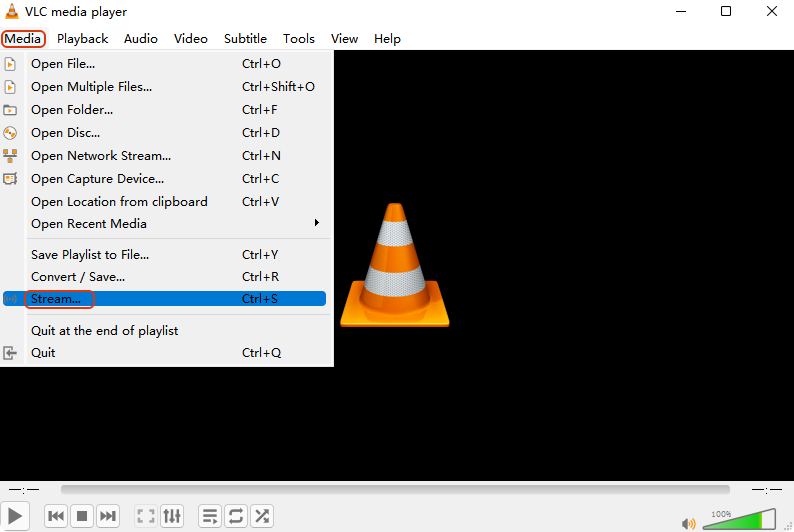
- Open VLC and head to Media from the upper menu, choose Stream.
![youtube mp3 to ogg vlc]()
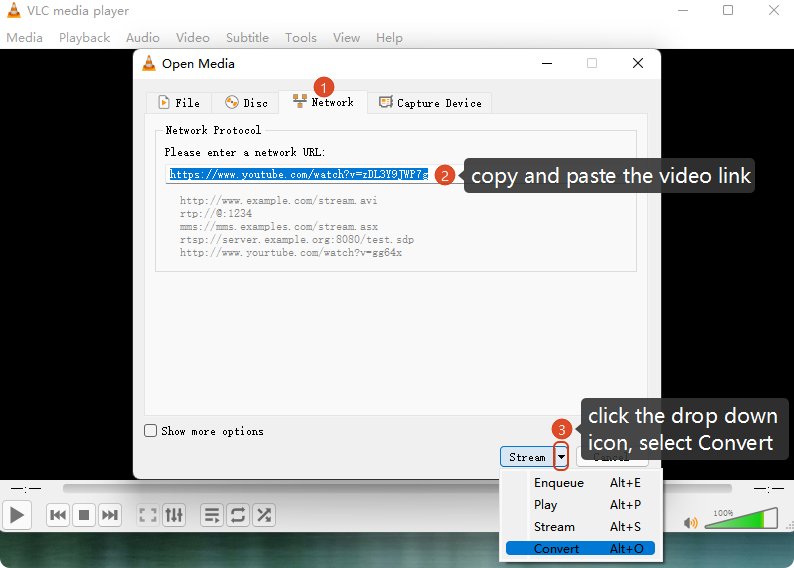
- In the dialogue box, switch to Network, copy and paste the YouTube video URL into the search bar, click the arrow down icon to select Convert.
![youtube playlist to ogg]()
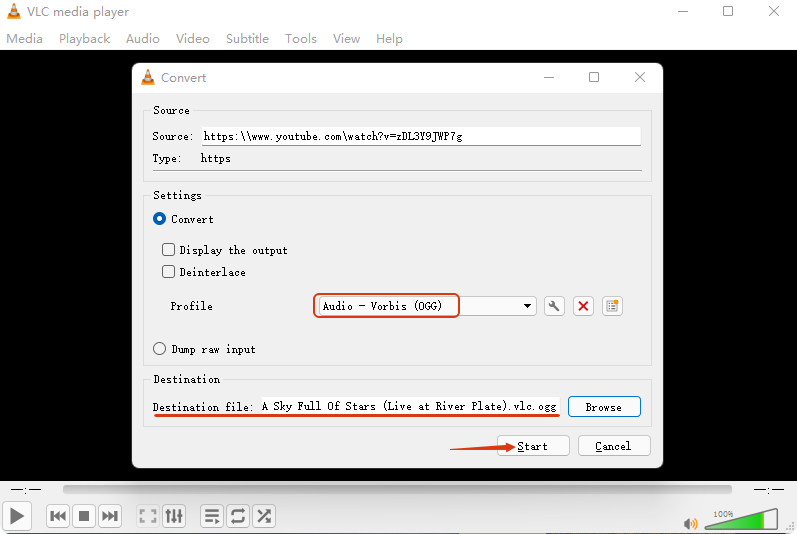
- Choose OGG as the output format, define a destination folder and hit on the Start button.
![youtube video to ogg converter]()
- Try if you can find successfully the converted file in the destination folder, for me, there’s just an error message.
![youtube video to ogg converter vlc]()

Chloe LEE is good at explaining and solving complex technology problems to her readers. Since joining iFunia Studio, she has focused on writing articles about video and DVD software, and how-to tutorials.
Comments (0)
Leave a Reply