


How to Download YouTube Shorts to iPhone Camera Roll (No Watermark, Original Quality)




You wouldn’t believe how hard it is to find a good, safe app to download YouTube Shorts and save them to the Camera Roll.
First, YouTube does not officially allow saving Shorts directly to Photos.
Also, YouTube and Apple prohibit tools on the App Store that can download YouTube videos outside a Premium subscription.
If you're searching online, you'll find some online sites from which you can download YouTube Shorts. The thing is, with Safari, the downloaded video often goes to the Files app, not Photos.
After several days of clicking random tabs and testing all available methods with my iPhone 16 Pro Max, I do find some methods that save YouTube Shorts to the iPhone Camera Roll. I’ll share my two favorite methods with you in a moment.
 iFunia YouTube Downloader
Save YouTube Shorts to iPhone Camera Roll in High Quality
- Video Downloader - YouTube, TikTok, Facebook, Vimeo, Instagram, and 10000+ websites
- Save both short and long YouTube videos
- Download in multiple video qualities: 1080p, 4k, 8k, etc.
- Save as popular video and audio formats, MP4, MP3, WebM, M4A, MOV, etc.
- Batch & Playlists - Download multiple videos or entire playlists
- Audio Extraction - Extract audio in MP3, M4A, or Opus format
- Subtitle Support - Download video with subtitles
- Completely Ad-Free experience
- Fully compatible with Windows, Mac
 Free Download Windows 10 or later
 Free Download macOS 10.13 or later
Why Downloading YouTube Shorts Directly on iPhone Is Challenging in 2026
Apple App Store Guideline 5.2.3
App Store Guideline 5.2.3 strictly prohibits video downloader apps, especially YouTube Downloader. So, it's hard to find an app that can download YouTube shorts on the App Store.
"Apps should not facilitate illegal file sharing or include the ability to save, convert, or download media from third-party sources (e.g. Apple Music, YouTube, SoundCloud, Vimeo, etc.) without explicit authorization from those sources."
Difference of YouTube Shorts vs Regular Videos
YouTube Shorts are vertical (9:16) and often are 1080 x 1920 pixels. While regular YouTube videos follow a horizontal, 16:9 aspect ratio in 1080p or higher (up to 4K) resolution.
YouTube Shorts use a specific URL structure, youtube.com/shorts/VideoID
Regular videos use youtube.com/watch?v=VideoID, so you will be unable to use a common YouTube downloader to get the video offline.
Wait, Is It Legal to Download Videos from YouTube Shorts?
You can certainly legally download your own YouTube Shorts videos.
For videos by other uploaders, things are a bit complicated. If you download YouTube Shorts videos to your iPhone using YouTube’s premium, it’s 100% on the up-and-up. While downloading, re-uploading, or rebroadcasting YouTube Shorts without the uploader’s consent is against the YouTube Terms of Service, and we strongly discourage such activity.
The Methods I Have Tried:
- Online YouTube Shorts Downloader
- YouTube Premium
- Screen Recorder
- iOS Shortcuts
- Documents by Readdle
- Desktop YouTube Shorts Downloader
Can You Download YouTube Shorts Directly on iPhone?
Technically? Yes. But also not in the way you might expect. YouTube does not provide an official way to save Shorts directly to the Photos app. Before I settled on the methods I currently use, I had to deal with
- Browser extensions that don’t support downloading YouTube videos.
- Sketchy online YouTube Shorts download websites with constant pop-up ads that only download one video at a time and only save videos in 720p or lower quality.
- YouTube Premium, which costs $13.99 per month, just gets a cached file that can only be played within the app, not what I expect as a traditional video file (like MP4) saved to the device gallery.
- The shortcut method was talked about a lot on Reddit. It's very hard to find a workable YouTube Shorts download shortcut, and it's not stable; what worked today will be unusable tomorrow.
- Documents by Readdle, which most people recommend for downloading videos, but in my test, it failed to download YouTube short videos. videos, and even entire YouTube channels.
Get YouTube Shorts on iPhone - The Two Methods I settled on:
I wasn’t keen on using online sites to download low-quality YouTube Shorts videos and save them to the Files app, so I kept looking. Below are the two methods I settled on.
Save YouTube Shorts to iPhone Camera Roll in High Quality
iFunia YouTube Downloader is designed for one simple purpose: to help you download YouTube videos quickly and without any hassle. It supports high-quality 4K, 8K, and 1080p YouTube video downloads, downloading entire playlists, downloading with subtitles, YouTube Shorts, private videos, and even entire YouTube channels.
In addition to just YouTube, it can actually download videos from 10000+ streaming sites, including TikTok, Instagram, Vimeo, Twitch, SoundCloud, BiliBili, etc.
Why Desktop Software is Safer than Online Downloaders
iFunia YouTube Downloader is the app I use when I need to download multiple videos or a playlist at once. I like its simple 1-click interface that lets users copy the link and start downloading right away.
Compared with online sites, iFunia also supports downloading in a much higher quality, 1080p, 4k, or even 8k.
Step-by-Step: How to Save YouTube Shorts to Camera Roll on iPhone
To save YouTube Shorts to your iPhone camera roll, copy the url of the shorts video, download the Shorts video file as MP4, MOV, or music formats like MP3 and M4A. If the format is supported by iOS, the video will appear in the Photos app automatically.
Steps:
- Open YouTube Shorts and find the videos you want to download.
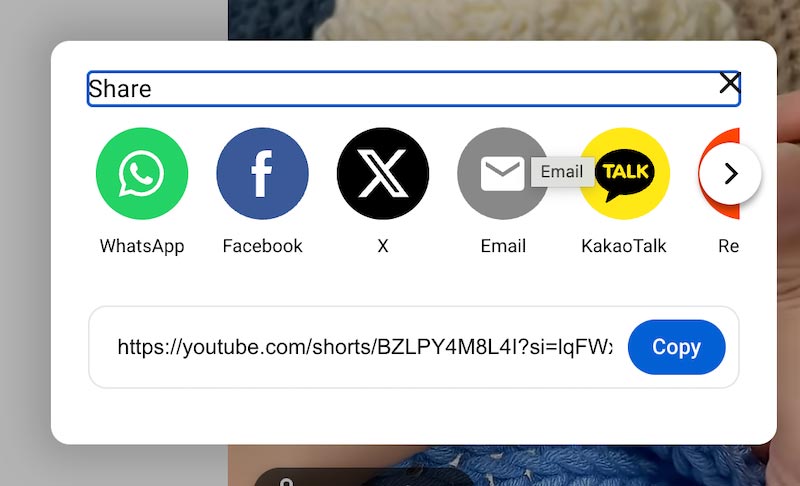
- Tap Share and copy the video url.
![]()
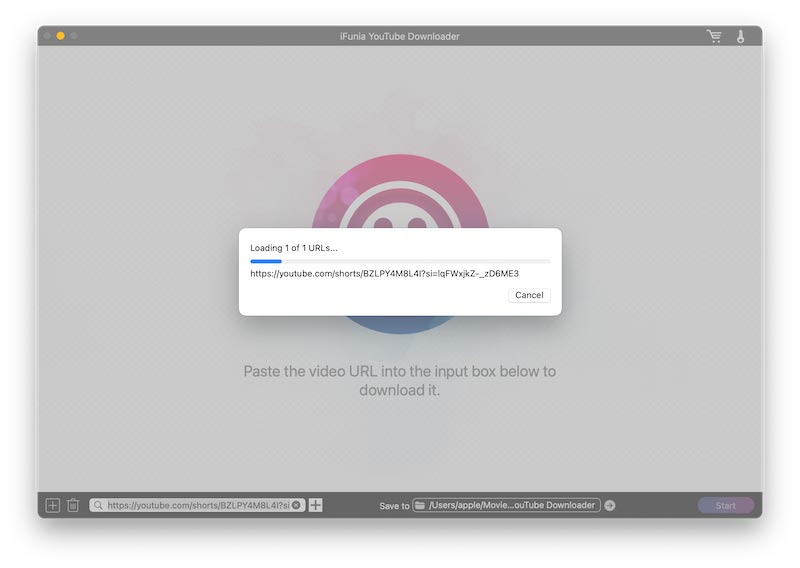
- Open iFunia YouTube Downloader.
- The app will automatically detect the URL you copied, and you just need to click the plus icon; the app will then start analyzing the video.
![]()
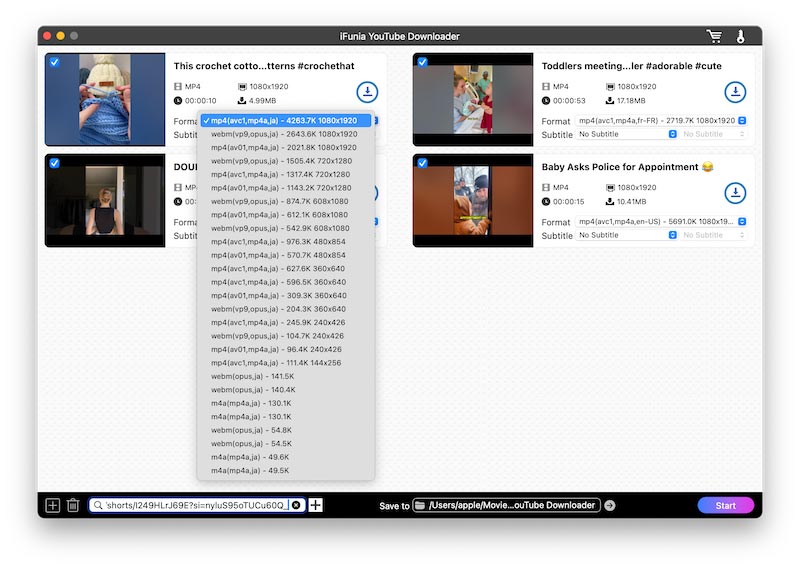
- You then need to choose the quality and format for the videos. Although you can select 4K, it’s more sensible to choose 1080p as no iPhone or iPad yet has a 4K screen.
![]()
- The video will then show in your Camera Roll.
If you can't find the video in Camera Roll, then you can use Airdrop to transfer the video to iPhone.
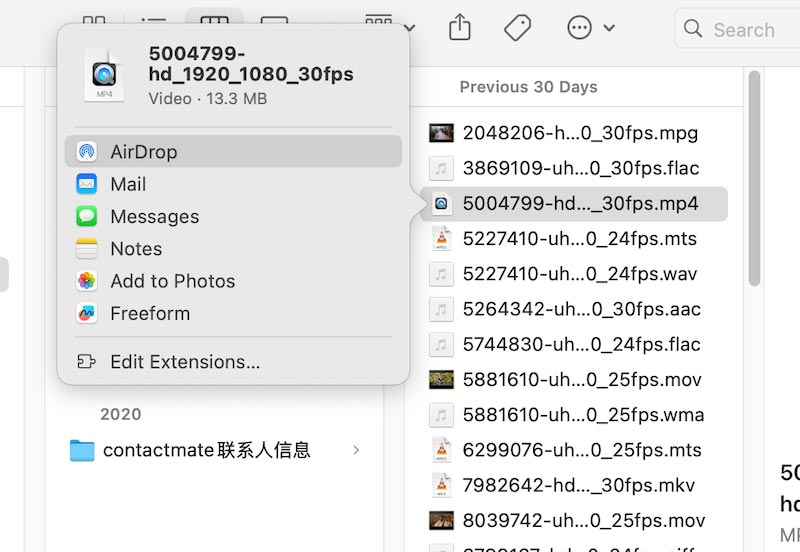
- Open Finder and find the downloaded shorts videos.
- Select the file(s). and click Click the Share button > AirDrop.
![]()
- In the pop-up menu, click on your iPhone.
- On your iPhone, make sure to accept the AirDrop files by tapping "Accept" when prompted.
In my testing, iFunia YouTube Downloader was able to download all the short videos I needed to save. I also tried iFunia YouTube Downloader on TikTok, Facebook, Instagram, and Vimeo; it worked quite well with those sites too, even Instagram Reels. One thing is that it failed to download Instagram Stories and some videos from YouTube Music; after I added the URL, it just kept loading.
How to Download YouTube Shorts Audio to iPhone
To get your desired audio from YouTube Shorts, just copy the Shorts video link and paste it into the app. Choose an output format like MP3 or M4A, click start, and the audio will be saved immediately.
How to Download YouTube Shorts Playlist to iPhone
Find the YouTube Shorts playlist you want to download, and copy the URL. A single click on the Start button is all you need after that.
Record YouTube Shorts on iPhone/iPad
Since short videos are short, in some cases "screen recording" is sufficient.
For iOS users, recording the screen on YouTube Shorts is easy. iOS 26 has a built-in screen recorder, and it breaks through the barrier of recording video and audio separately.
If you only need to download 1 or 2 shorts, it may be quicker to save the video by recording it yourself rather than using a tool.
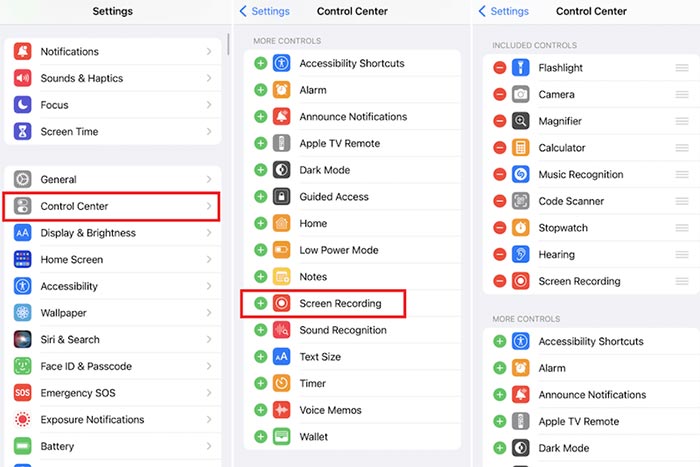
- Open your iPhone, and go to "Settings" > "Control Center."
- If you see "Screen Recording" is included in the list, then fine. Otherwise, find "Screen Recording" in "More Controls" and tap the "+" next to it to add it to the Control Center.
![]()
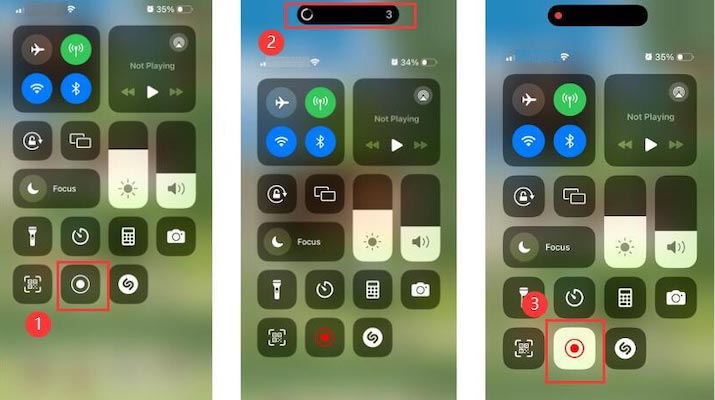
- Swipe down from the top right corner of the iPhone's screen to access Control Center.
- Press the Record icon and wait for the 3-second countdown. When the recording icon turns red, it will start recording the screen.
![]()
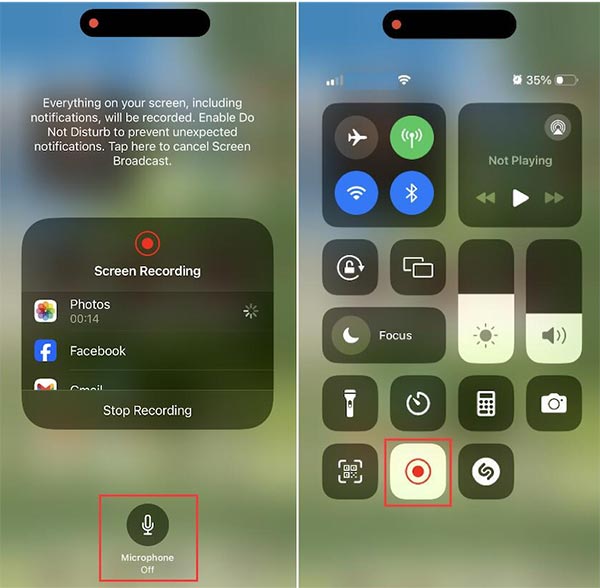
- To record the screen and audio at the same time, press and hold the screen recording button and then turn on the microphone.
![]()
- When you want to end the screen recording, swipe down and hit the red Record icon in Control Center again.
- The recorded YouTube Shorts video will be saved to your Photos app.
Simple tools for simple problems
I was initially surprised at how difficult it is to download YouTube Shorts videos.
But short videos are only 3 minutes long; we can just use a screen recorder to save them to the camera roll, or if you need to download batches of videos or playlists, iFunia YouTube Downloader is a good choice.
Well… I’ve shown you my best YouTube Shorts to iPhone workaround. Welcome to the dark side. We have downloads😎📲

Chloe LEE is good at explaining and solving complex technology problems to her readers. Since joining iFunia Studio, she has focused on writing articles about video and DVD software, and how-to tutorials.
Comments (0)
Leave a Reply