


Best YouTube to MIDI Converters in 2026 (Free, AI & Online Tools)




You’ve probably searched everywhere over the internet for the best app to turn a song you heard on YouTube into MIDI.
I know, you need something like true music notes, because MIDI is data (notes), not sound. But most standard converters are just broken or produce garbage results, not true MIDI.
In this guide, we show you the workflow: how to download the audio and use the best AI tools to transcribe YouTube to MIDI.
Part 1. 2 facts about YouTube to MIDI conversion
Before we get started, here's a question. What is MIDI?
Standing for Musical Instrument Digital Interface, MIDI transmits event data (such as note pitch and note velocity) between instruments. Unlike MP3, MIDI is not an audio format. MIDI files don't carry any audio signals. They only contain instructions to tell computers, electronic musical instruments and other hardware what to do. MIDI comes with many benefits. It makes music-making way easier and more creative because it’s easier to modify and manipulate music as data.
#1 You need to convert YouTube to audio first.
It's impossible to directly convert YouTube to MIDI. To make the conversion possible, one needs to extract audio from a YouTube video first. The second part of this article will walk you through the process of such an extraction.
#2 The conversion may not be perfect.
In many cases, the result may not be as good as expected. If it's an instrumental solo piece such as a piano solo, one will probably have good luck. However, if it’s a song with various instruments and vocals, it’s almost impossible to get a satisfactory conversion. If the YouTube to MIDI conversion is decent with only some minor mistakes, you can actually manually modify and edit it.
Method 1: The Online "Direct" Converters (Quick but lower quality)
This online tool is dedicated to converting YouTube to MIDI. It requires no registration, software installation, or account. It's web-based, so you can convert YouTube to MIDI online on Windows, macOS, Android, etc.
Step 1. Go to YouTube, copy the YouTube video URL, and paste it in the URL box of youtube2midi. Click the Convert button.
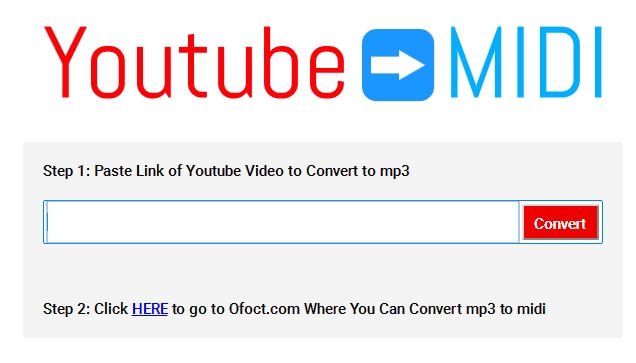
Step 2. Click the hyperlinked word HERE, and you will be directed to Bear File Converter, an online tool to convert audio, video, documents, images, etc. It supports various input formats, and you can use it as a free WAV to MIDI converter or a free MP3 to MIDI converter.
Step 3. Click the Upload button to import the downloaded YouTube audio file. Alternatively, you can also drag and drop the file. It's worth mentioning that this online tool doesn't support files of less than 50M in size.
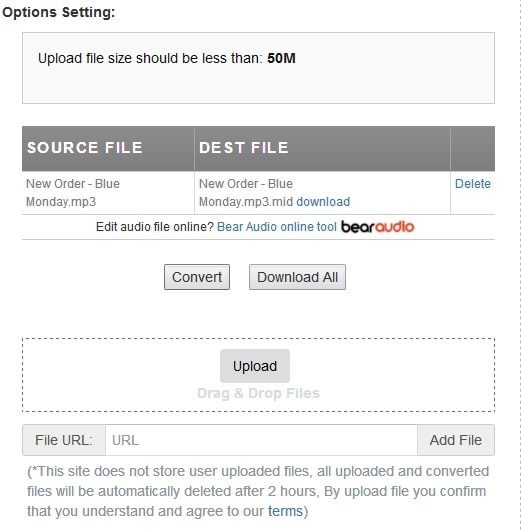
Step 4. When the file loading is finished, click the Convert button. After the conversion is done, you will find a hyperlinked download button. Just click the button to start downloading.
Method 2: The Professional 2-Step Method (Best for high quality)
For the best results, we recommend you use a dedicated YouTube downloader to save the audio in high quality, then use AI software to turn it into MIDI notes.
Step 1: Download YouTube Audio to WAV/MP3
iFunia YouTube Downloader is what Reddit users recommend as a good choice to download videos from YouTube in various resolutions, such as HD, 1080p, 2k, 4k, 8k, etc.
Compared with online download sites, this app is stable and updated frequently to adapt to YouTube’s algorithm change. It can save YouTube videos in WAV, MP3, AAC, MP4, ALAC, FLAC, etc. formats. Besides, it supports downloading video and audio from 10000+ video-sharing websites like YouTube, Facebook, TikTok, Spotify, SoundCloud, Dailymotion, Vimeo, and more.
Step 1. Download and install this YouTube audio downloader.
 Free Download Windows 10 or later
  Free Download macOS 10.13 or later
Step 2. Open YouTube and find the video you want to convert to MIDI. Copy its link address. Go back to the said app and paste the link in the URL field.
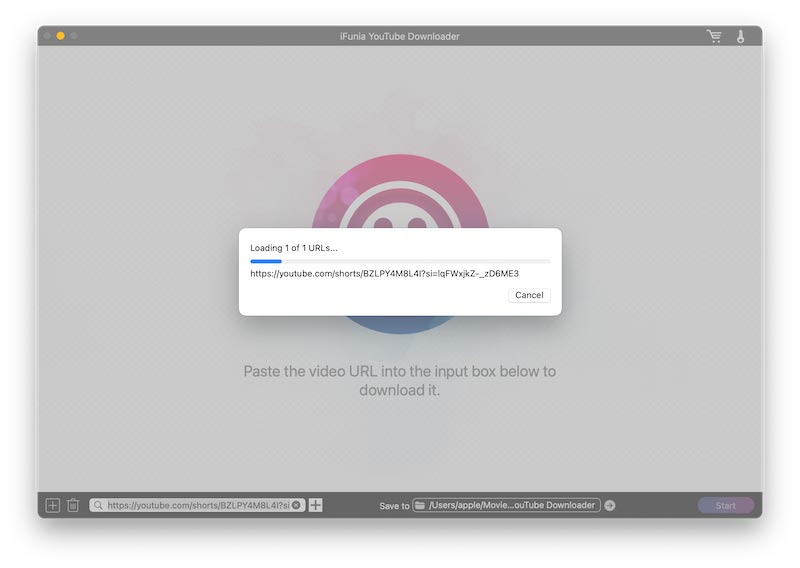
Step 3. The app will automatically detect the URL you copied, and you just need to click the plus icon; the app will then start analyzing the video.
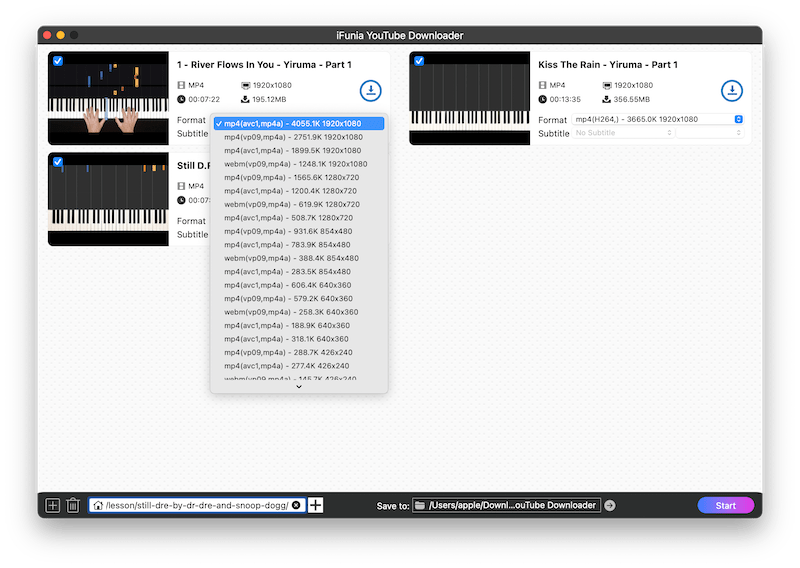
Within a few seconds, iFunia Free YouTube Downloader will list all the added videos and show the available output formats and quality.
Step 4. Now click the Download button to begin downloading YouTube audio to your computer. You can locate the downloaded audio by clicking on the open icon.
Step 2: Convert Audio to MIDI using AI Tools
Important note: Many people think that the open-source freeware audio editor Audacity can be used to convert audio to MIDI, but the fact is that it can’t. Audacity does come with an option called "Export MIDI," but this option is grayed out.
#1 Basic Pitch (by Spotify):
Basic Pitch is an audio-to-MIDI converter made by engineers from Spotify. It is free, open-source, and highly accurate. Most Reddit users recommend this as the best audio-to-MIDI converter. It runs in the browser and uses machine learning algorithms to transcribe the audio into MIDI.
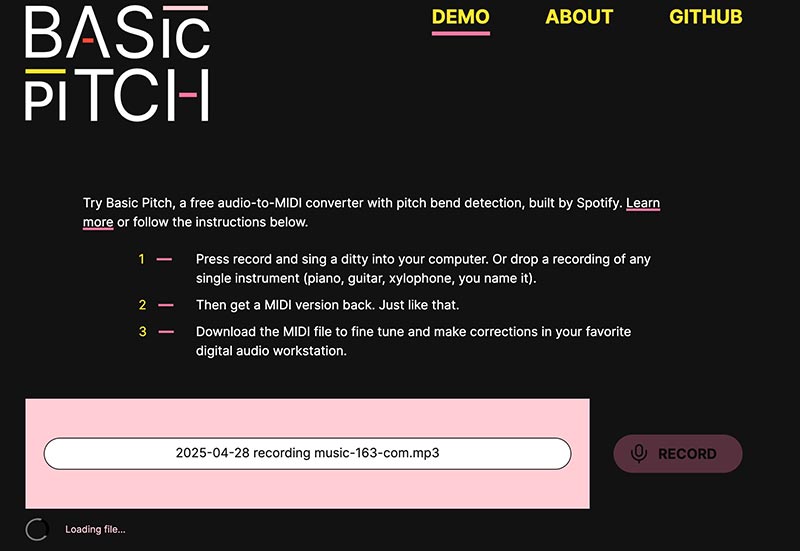
You just upload a track, and it will start analyzing and converting it to MIDI.
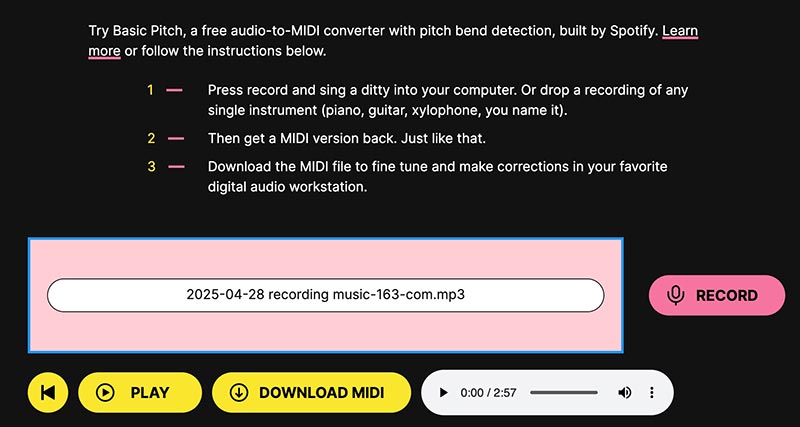
After analyzing, just click Download MIDI to get the file you need.
Some Other YouTube to MIDI Converters to Consider
#1 Logic Pro
Supported OS: macOS 12.3 or later
Logic Pro is a piece of DAW (digital audio workstation) software, which can also work as a MIDI sequencer. The app is available in English, German, Japanese, and three other languages. It's considered one of the most popular DAWs, only second to Ableton Live.
To be able to convert YouTube to MIDI using Logic Pro, you need to purchase and install it from the Mac App Store. It’s a paid app. If you are looking for the best MP3 to MIDI converter, powerful DAW software like Logic Pro can be a good choice.
Step 1. Install Logic Pro X and open it. From the toolbar at the top of your screen, select File > Import > Audio File. Select the MP3 or WAV audio you've extracted from a YouTube video and click Open. Alternatively, you can simply drag and drop files.
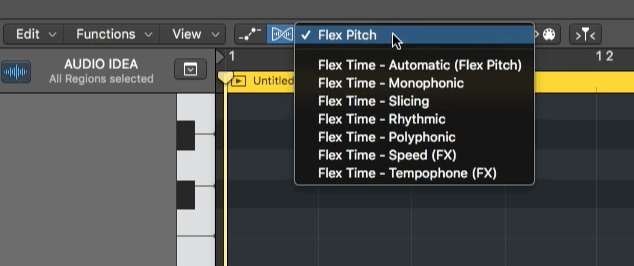
Step 2. Select the YouTube audio and press E to open the editor. Go to the Track tab. In the upper left corner of the editor, click the Flex button. Click the drop-down list next to the button and make sure you select Flex Pitch.
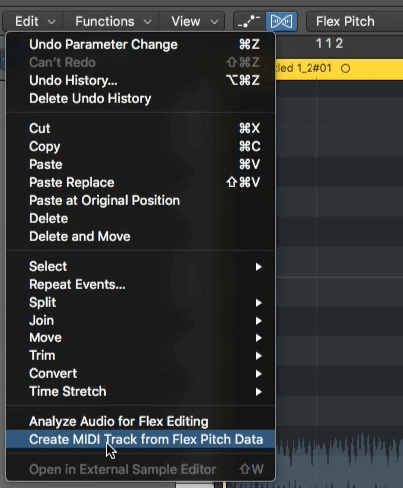
Step 3. Now you should get the MIDI notes for the YouTube audio. Click the Edit drop-down menu in the upper left corner of the editor window and choose Create MIDI Track from Flex Pitch Data.
Step 4. Compare the MIDI track with your YouTube audio track and see if there are any mistakes in this YouTube to MIDI conversion. If there are, open the editor and correct the mistakes by manually adjusting individual MIDI notes until you are happy with the result.
#2 Ableton Live
Supported OS: Windows 7, 8, 10, 11; MacOS X 10.13 or later
Available for both Windows and macOS, Ableton Live is a powerful, versatile DAW. After you save YouTube to MP3 or WAV, you can use this app to convert your YouTube audio to MIDI. It comes in three editions: Intro, Standard, and Suite. Some of its supported audio file formats are WAV, AIFF, FLAC, OGG, MP3, and M4A.
Note: The Audio to MIDI feature is not available in the Intro edition. In other words, if you want to convert YouTube audio to MIDI using Ableton Live, you need to buy the Standard or Suite edition.
Step 1. Open Ableton Live on your PC or Mac. By default, there are four channels in the main window: two MIDI channels and two audio channels. Drag the YouTube audio track into an audio channel.
Step 2. Right-click or control-click the track, and you will find these options: Convert Harmony to New MIDI Track. Convert Melody to a new MIDI track and convert Drums to a new MIDI track. Choose an option based on your need. The conversion from YouTube audio to MIDI will immediately start.
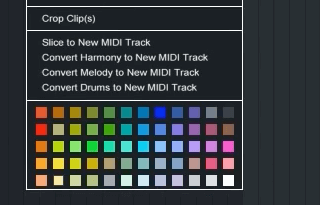
Step 3. Now you can listen to and compare the audio track and the MIDI track and see how well the conversion is done. You can manually make adjustments if needed. If you are happy with the conversion from YouTube to MIDI, right-click or control-click on the MIDI track and choose Export MIDI Clip.
#3 FL Studio
Supported OS: Windows 8.1, 10, 11, or later; macOS 10.13.6 or later
Here's another powerful DAW. Just like Ableton Live, it also comes in different editions. The good news is that the MIDI-related features are available in all editions. There is also a free demo version with limited access to the app's features and plugins.
Step 1. Launch FL Studio on your computer. Drag in the YouTube audio track you've extracted.
Step 2. Click on the top left corner of the track, and a few options will show up. Select Edit sample. The Edison window will pop up.
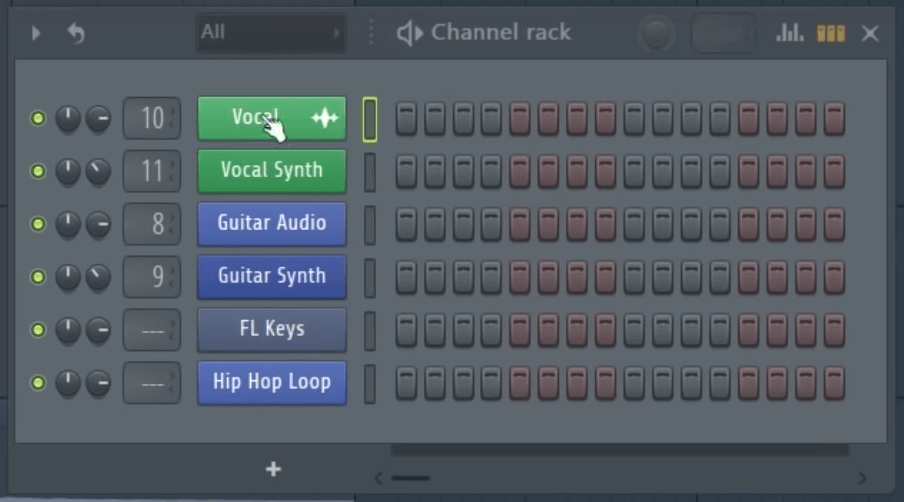
Step 3. At the top of the app's interface, select a pattern according to your need, say, Vocal MIDI. In the Channel rack panel, select the desirable option.
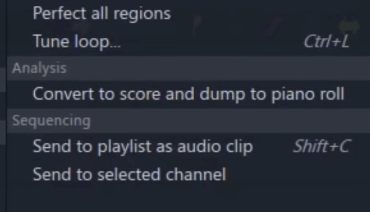
Step 4. Inside Edison, click the spanner icon in the toolbar. Select Analysis > Convert to score and dump to piano roll. Now the MIDI notes should appear.
Step 5. To export the MIDI (.mid) file, click the top left corner for the piano roll options and select File > Export as MIDI file.
Conclusion
Thanks to DAW software and audio-to-MIDI converters, it's possible to create MIDI files from almost any audio, whether it is an audio clip ripped from YouTube, an instrument solo, or even a humming. The conversion results may vary significantly, though. If you want to get the best possible conversion, it's recommended to use professional digital audio workstations.

Chloe LEE is good at explaining and solving complex technology problems to her readers. Since joining iFunia Studio, she has focused on writing articles about video and DVD software, and how-to tutorials.
Comments (0)
Leave a Reply