


Convert MKV to MP4 on Mac with Best Quality: 4 Easy Ways




"I was wondering if there was any way to convert an h.264 MKV file (with subtitles) into an MP4 file on Mac, for watching MKV on new iPhone without losing the quality. Any freeware or shareware suggestion would be greatly appreciated."
This article will show you how to convert MKV to MP4 on Mac with different ways. Supporting all common video and audio codecs, Matroska (or MKV) is a versatile multimedia container format and allows high flexibility. However, unlike its more popular counterparts such as MP4, MKV is not widely supported by devices and software. Having problems with MKV playback? Why not just convert it to MP4?
 iFunia Video Converter
Best MKV to MP4 Converter for Mac
- Convert MKV to MP4, AVI, MOV, MP3 and other 400+ videos and audios
- Support bulk conversions
- Support 4K videos
- Offer a fast conversion speed
- Ensure to cause no damage in quality and content
- Compress MP4, MOV, MKV, HD, 4K, 8K... to smallest possible size without visible quality loss
- Edit files: trim/crop/rotate/merge files, add subtitles/watermarks/3D effects, etc.
- Make an advanced editing in file parameters, change video/audio quality, frame rate, bitrate, etc.
- Can also work on Windows
 Free Download macOS 10.13 or later
  Free Download Windows 10 or later
The best way to convert MKV to MP4 on Mac
You can use iFunia Free Video Converter to easily convert MKV to MP4 or other formats, and vice versa. It's a video converter, audio converter, video compressor and video editor, all rolled into one.
- Convert videos and audios between 400+ formats
- Convert all MKV videos, including the 4K ones and large ones, without quality loss
- Support batch conversion and batch download
- Compress MP4, MOV, MKV, HD, 4K, 8K... to smallest possible size without visible quality loss
- Do basic video editing such as adding subtitles, cropping, etc.
- Support on Mac and Windows
Below is how to convert MKV files to MP4 on Mac without re-encoding in three easy steps.
Free Download macOS 10.13 or later
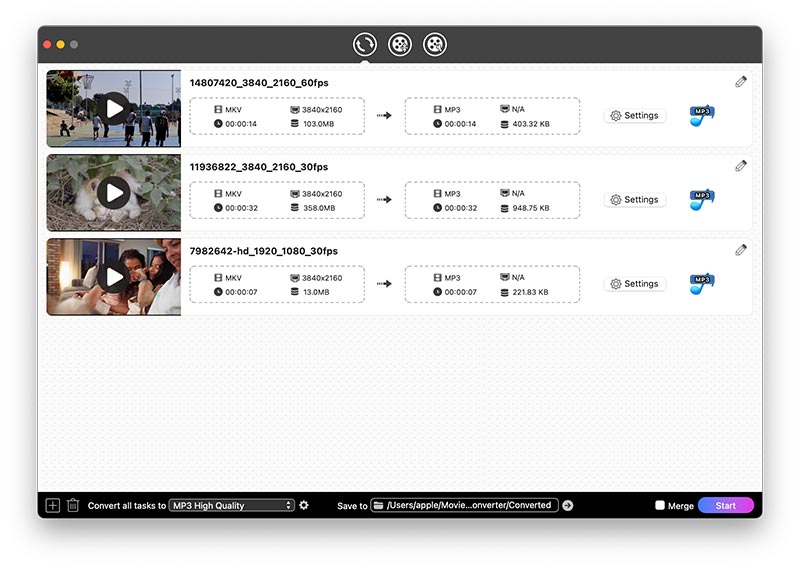
Step 1. Download and install iFunia MKV to MP4 converter on your Mac. Launch it, drag an MKV file into the app. To batch convert MKV to MP4, just add multiple videos.
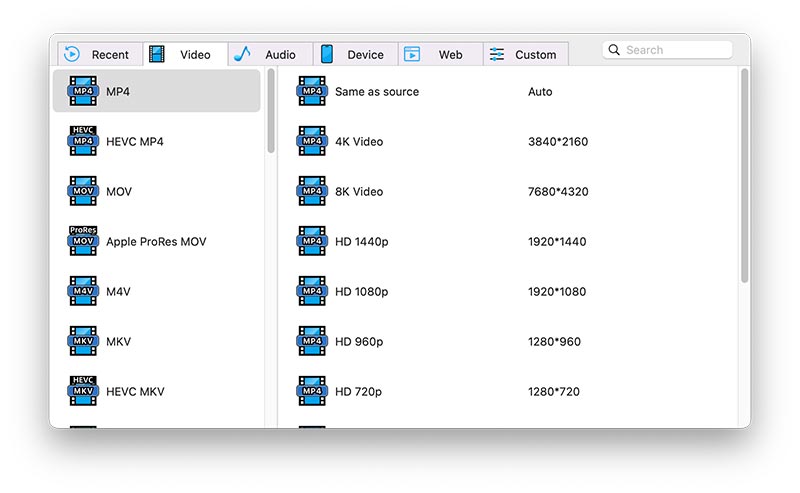
Step 2. Click the Format button, and the Output Format window will appear. In video, select the format you need. In this case, we choose .mp4.
Step 3. Click the Start icon in the lower right corner of the main interface.
Once the MKV to MP4 conversion is completed, you can click the tick icon to find the MP4 file. Now you can easily play your video in media players that don't support for MKV, say iTunes. And you will find that the original quality is retained.
Pro tips
- Perform editing If needed, you can edit your MKV video before conversion. Just click the edit icon next to the Format button. It provides seven editing functions including Trim, Crop, Effects, Rotate, Watermarks, Subtitles & Audio and 3D Effects.
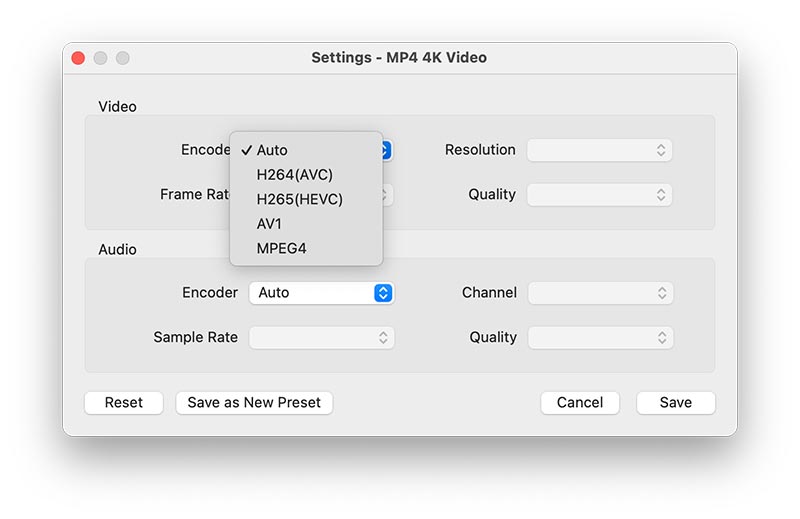
- Customize settings In the Output Format window, click Advanced Settings and adjust frame rate and other things based on your need. It also enables you to re-encode your video.
Convert MKV to MP4 using VLC media player
Pros:
- Able to convert MKV files including the large ones to various common formats
- Also provide other video related features that users may need
Cons:
- Need to manually change the extension of converted video to .mp4
- The converted video will end up being much larger than the original MKV one
VLC is more than just a free, open-source media player. It also comes with an array of hidden features, and video conversion is one of them. It may not be that straightforward. If you have no idea where to get started, just follow the following guide to converting MKV container to MP4 on Mac with VLC.
Step 1. Download, install and open the app. In the menu bar at the top of your Mac screen, select File > Convert/Stream.

Step 2. In the Convert & Stream window, click Open media to import your MKV file. Alternatively, you can add file by dragging and dropping.
Step 3. In the Choose Profile section, click the dropdown list and select the desired output option. These options take the form of media type - video codec + audio codec (container format). Here we choose Video - H.264 + MP3 (MP4).

Step 4. This step is optional and for advanced users only. If the default output options don't meet your need, click Customize. Choose from the available video codecs and audio codecs. You can also manually adjust sample rate, bitrate, frame rate, etc.
Step 5. In the Choose Destination section, click Save as File. Click Browse and select a destination location. Click Save.
Note: If you choose MP4 as the output container format, VLC will convert your video to M4V (which is almost the same as the MP4 format). You can find the converted video and manually change its extension from .m4v to .mp4.
In the test, it took quite a while for the conversion process to complete. If you are looking for the fastest method, the first app is recommended.
Convert MKV to MP4 with HandBrake
Pros:
- Can handle big MKV files
- Offer useful advanced features
Cons:
- Slow conversion
- The default settings may automatically compress your video
HandBrake is a free, open source video transcoder. If you are not sort of video format savvy, you may feel overwhelmed by HandBrake's interface and the features it offers. The steps below will walk you through the process of changing MKV to MP4 on Mac.
Step 1. Download HandBrake and get it installed on your Mac. Open the app.
Step 2. Click Open Source in the upper left corner. Select the MKV video you want to convert and click Open. Wait for the file to be fully loaded.
Step 3. Navigate to the Summary tab. Click the Format drop-down list and select MP4 File. Leave the default settings unchanged if your only purpose is to convert MKV to MP4 format.

Step 4. In the lower left corner of the interface, you can edit file name in the Save As field. Please leave the extension (.mp4) as it is. The default destination folder is Desktop. You can change it by clicking the Browse button.
Step 5. Click Start in the top toolbar. The app will start encoding your video.
Advanced users can set up Presets and configure options to get the desired conversion results. And the default settings should be enough for most basic video conversion tasks. However, when it comes to high-resolution videos such as 4K, you need to go to Presets > Web and click Video YouTube HQ 2160p60 4K. Otherwise, your video will be shrunk by default.

Convert MKV to MP4 on Mac online
Pros:
- Easy to use and cross-platform
- Require no software installation
Cons:
- Can't convert large MKV files to MP4 due to size limit
- It will take a long time since you need to upload video first
Another common way to free convert video files is to use web-based tools. Such tools are compatible with not only macOS but also Windows. They are handy to use and don't require installation. Here we will take Zamzar as an example and show you how to convert.
Step 1. Go to https://www.zamzar.com/convert/mkv-to-mp4/. This page is dedicated to MKV to MP4 conversion, so there is not need to choose the output format.
Step 2. Click Add Files and add a MKV video. Click Convert Now. It will start uploading your video to their server.

Step 3. Once it finishes uploading, click Convert. As soon as the conversion finishes, you will be redirected to the download page. Click Download to save the file to your Mac.
For free users, however, there are size limits. The size limit may vary depending on the online MKV to MP4 converter you use. For Zamzar, it's 50 MB. Paid users can perform conversion without any restriction.
Conclusion
It's also possible to convert MKV to MP4 on Mac in Terminal with FFmpeg installed, which is not covered in this article because it involves use of the command line. The easiest and fastest solution is to use the best MKV to MP4 converter. The MP4 format comes with way more support and is compatible with almost all players, devices and editing software. After the conversion, you can easily use your videos for playback, editing and other purposes.

Chloe LEE is good at explaining and solving complex technology problems to her readers. Since joining iFunia Studio, she has focused on writing articles about video and DVD software, and how-to tutorials.
Comments (1)
Leave a Reply
avenue17
Bravo, what words..., an excellent idea